Quick Facts
- Rollout Status: Wave 1 starts July 7, 2026 (Algeria and Ghana); Global launch begins September 2026.
- Handle Constraints: Usernames must be between 3 and 35 characters using lowercase letters, numbers, periods, or underscores.
- Privacy Controls: Features an optional 4-digit 'Username Key' to regulate who can initiate a search for your profile.
- Safety Window: A 14-day cooling period applies to changed handles, preventing others from claiming your previous alias immediately.
- Business Benefit: Meta Verified businesses received early reservation access in May 2026 to secure brand-specific handles.
- Technical Shift: Transitioning toward a Meta ecosystem where a unique alias replaces the requirement to share a private phone number.
To set up a whatsapp username, navigate to Settings and tap your profile icon. Select the Username option to create or reserve a handle between 3 and 35 characters using letters, numbers, underscores, and periods. This feature allows you to connect with new contacts using a unique alias instead of your private phone number, though existing contacts will still see your mobile info.
The WhatsApp Username Rollout: 2026 Roadmap
The long-awaited whatsapp username feature is finally here, allowing users to move toward a more private Meta ecosystem by using a unique alias instead of a phone number. This shift represents a significant evolution for a platform that serves approximately 3 billion unique active users across more than 180 countries. For years, the requirement to share a phone number was the primary barrier for many users concerned about communication privacy. With the 2026 update, Meta is finally addressing this by decoupling identity from mobile digits.
The rollout is being handled in phased waves to ensure server stability, especially considering the platform processes over 100 billion messages daily and more than 7 billion calls. Most users are eager to know the whatsapp username update release date for their specific region. While Business API users were granted early reservation access in May 2026 to protect verified brands, the general consumer rollout follows a more geographic strategy.
| Region / User Type | Release Window |
|---|---|
| Meta Verified Business Users | May 2026 (Reservation Only) |
| Wave 1 (Algeria, Ghana, and select regions) | July 7, 2026 |
| Global Rollout (Europe, Americas, Asia) | Starting September 2026 |
| Full Integration Completion | Expected December 2026 |
If you are not in a Wave 1 region, you likely see a "Coming Soon" notification or simply don't have the menu option yet. It is crucial to keep your app updated to the latest version from the App Store or Play Store to ensure you can claim your preferred handle the moment it goes live in your territory.
How to Set Up WhatsApp Username on iOS and Android
Once the feature is live in your region, the process of finding how to set up whatsapp username is straightforward, though the UI nuances differ slightly between the two major mobile operating systems. The key is to manage your digital identity through the Profile settings rather than the Account settings.
For iPhone users, the path is integrated into the redesigned profile section. Open the app and tap on the Settings tab in the bottom right corner. Tap on your name at the top to open your Profile. You will see a new field labeled Username. Tapping this will allow you to enter your desired handle. If the name is available, a green checkmark will appear. Once confirmed, this unique alias becomes your primary identifier for new contacts.
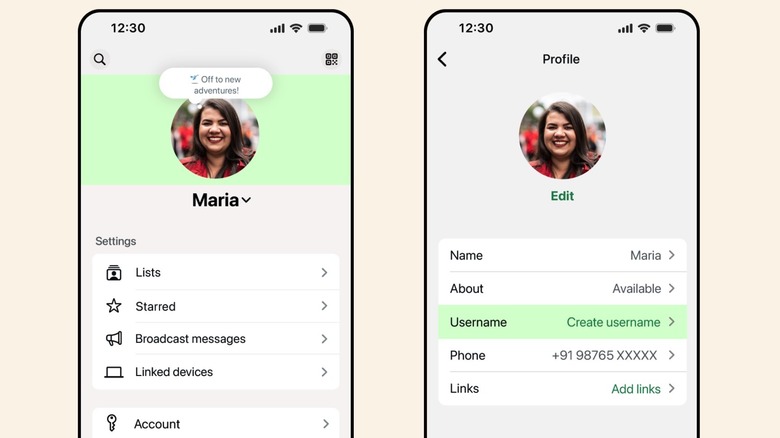
Android users follow a similar logic but within the Material You design framework. Tap the three dots in the top right corner and select Settings. Tap your profile picture to enter the edit screen. Underneath your Name and About sections, there is now an entry for Username. Enter your choice and wait for the platform to validate the handle availability. If you are wondering how to reserve whatsapp username on android and ios before someone else does, the only way is to ensure you have a Meta Verified status or to wait for your specific wave to trigger.
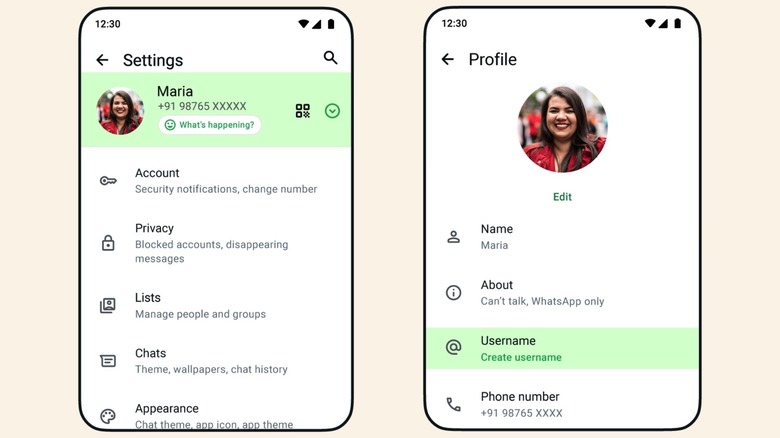
After you have saved your choice, your QR code will also update to include your alias, making it easier to share your contact information in professional or social settings without exposing your mobile number.
Character Requirements and Aesthetic Name Ideas
When choosing your handle, you must adhere to specific technical constraints established by the platform. These whatsapp username character limits and symbols are designed to maintain clarity and prevent impersonation across the Meta ecosystem.
The system requires unique handles to be between 3 and 35 characters long, using lowercase letters, numbers, periods, or underscores. You cannot use consecutive periods (like john..doe), nor can you start or end the handle with a period or underscore. Furthermore, specific restricted terms including "whatsapp," "meta," and generic web addresses like ".com" are prohibited to prevent phishing.
If you are stuck on whatsapp username ideas, consider how you intend to use the platform. For a professional presence, a combination of your first initial and last name (e.g., s_zhang_tech) is standard. For a more aesthetic or personal approach, many users are opting for minimalist handles like blue.vibes.26 or pixel.explorer. Since these handles cannot be changed frequently without risk, pick something that balances longevity with personal brand identity.
Caution: If you decide to change your handle, the previous alias remains restricted for 14 days before it can be claimed by another user. This provides a critical safety window for your digital identity, ensuring that someone cannot immediately impersonate you if you make a mistake during the renaming process.
Privacy First: Phone Number Protection and the Username Key
The most impactful part of this update is the ability to use a whatsapp username instead of phone number for daily interactions. Historically, giving someone your WhatsApp meant giving them your direct mobile line—a significant privacy risk for those meeting people via marketplaces, dating apps, or professional networking groups.
Now, you can manage who can see my whatsapp username through refined privacy tiers. When you add a new contact using their alias, they do not automatically get access to your phone number. Your number remains visible only to people who already have it saved in their phone's address book or those you have explicitly shared it with in the past.
To prevent spam, Meta has introduced an optional 4-digit security layer known as the Username Key. When enabled, someone trying to add you for the first time by searching your handle must also enter this PIN. This is a game-changer for phone number protection, as it stops bots and bad actors from scraping handles and mass-messaging users. It ensures that even if someone knows your unique alias, they still need your "permission" (the key) to initiate a chat.
For those wondering how to hide your phone number with a whatsapp username, the process is largely automated. Once your handle is active, the app defaults to hiding your digits from non-contacts. However, you should double-check your Privacy settings under the 'About' or 'Phone Number' visibility section to ensure the restriction is set to 'My Contacts' or 'Nobody.'
For Companies: WhatsApp Business Username Claim Guide
Business users have a different set of priorities, focusing on brand integrity and customer trust. The whatsapp business username claim guide involves a two-pronged approach. Small businesses using the standard Business App followed the same rollout as consumers, but they were encouraged to use their registered business names.
Larger enterprises using the WhatsApp Business API are seeing an even more technical transition. These accounts are moving toward a 128-character BSUID (Business Standard Unique Identifier) system, which allows for deeper CRM integration and Meta Verified badges. For these companies, the handle isn't just a social alias; it is a verified entry point for customer service.
If you manage a business account, checking handle availability early is vital. If a third party claims your brand name, you must go through a formal dispute resolution process via Meta's Brand Protection agency. Securing your handle alongside your Meta Verified status ensures that when customers search for you, they see the official checkmark, which significantly increases conversion rates and trust in the digital identity of your storefront.
FAQ
How do I create a username on WhatsApp?
Navigate to your Profile via the Settings menu. Tap on the section labeled Username and enter an alias that adheres to the 3-35 character limit. If the name is available, click Save to finalize your selection.
Can I use WhatsApp without sharing my phone number?
Yes, with the 2026 update, you can share your unique alias to initiate chats with new contacts. While a phone number is still required to register your account, it can remain hidden from anyone who doesn't already have it in their address book.
Are WhatsApp usernames available for all users?
The feature is rolling out in waves. As of July 2026, it is available in regions like Algeria and Ghana. A global release is scheduled for September 2026, so availability depends on your geographic location and app version.
How to hide your phone number with a WhatsApp username?
Once you set up your alias, go to Settings > Privacy > Phone Number. Set the visibility to 'My Contacts' or 'Nobody' to ensure that people you message via your handle cannot see your underlying mobile digits.
What are the character requirements for a WhatsApp username?
Usernames must be between 3 and 35 characters long. You can use lowercase letters, numbers, underscores, and periods. You cannot use spaces, special symbols, or consecutive periods.
How to change your WhatsApp username?
Return to the Profile edit screen and tap on your existing handle. You can enter a new name and save it. Keep in mind there is a 14-day cooling period during which your old handle cannot be claimed by others, giving you time to change your mind.