Quick Facts
- Retail Value: These premium headphones cost $549, yet they lack any official water or sweat resistance rating.
- Technical Cause: The high thermal conductivity of the aluminum earcups leads to moisture buildup when warm skin meets cold metal.
- Legal Context: A class-action lawsuit filed in California alleges that this design defect causes moisture to accumulate after as little as one hour of use.
- Reliability Issues: Reports of condensation death surfaced as early as January 2021, leading to sensor and driver failures.
- Recommended Fix: Use 70% isopropyl alcohol for cleaning and allow a minimum 24-hour drying period if moisture enters the internal ports.
- Primary Prevention: Storing the unit in a sealed case with silica gel desiccant packets is the most effective way to manage environmental humidity.
Fix AirPods Max condensation immediately by following our guide on moisture removal and preventative care. Whether you are dealing with condensation death or ANC button failures, understand why these $550 headphones are prone to moisture and how to protect your investment. AirPods Max condensation occurs primarily due to the aluminum earcups' high thermal conductivity; the metal cools quickly, causing moisture from body heat or humidity to turn into water droplets inside the cups. To resolve this, remove the cushions, wipe the drivers with a dry cloth, and use silica gel to absorb any deep-seated humidity.
Why AirPods Max Suffer from Moisture Buildup
As an audio editor, I have spent thousands of hours with high-end cans, and the AirPods Max are a masterclass in industrial design—with one glaring flaw. The choice of aluminum for the earcups provides a premium feel and structural rigidity, but from a thermal perspective, it is the root of the AirPods Max moisture buildup problem. Aluminum has extremely high thermal conductivity. When you wear these headphones, your body heat warms the air inside the earcups. If the external environment is cool, the aluminum shells act as a heat sink, causing the internal air to reach its dew point. The result? Water droplets form directly on the surface of the driver housing.
This is not just a minor annoyance; it is a documented hardware vulnerability. In a lawsuit filed in California, users allege that this moisture can accumulate after just one hour of normal use. Unlike many modern portable electronics, the AirPods Max carry no official IP rating. While the AirPods Pro 2 offer an IPX4 rating for sweat and water resistance, these $549 headphones have a rating of zero. This lack of protection makes the internal circuitry particularly susceptible to hardware corrosion once those water droplets begin to migrate.
The timeline of these issues is also telling. We saw reports of condensation death emerge as early as January 2021, only a month after the product launched. This suggests the issue is baked into the physical architecture of the device rather than being a result of long-term wear and tear. When the moisture reaches the small pinholes near the top of the earcups or the sensor arrays, it can cause the dreaded signs of permanent airpods max moisture damage, such as ghost touches on the volume dial or a total failure of the active noise cancellation.
Comparison of Water Resistance Ratings
| Product | Price (MSRP) | IP Rating | Recommended Use Case |
|---|---|---|---|
| AirPods Max | $549 | None (0) | Dry, Indoor Environments |
| AirPods Pro 2 | $249 | IPX4 | Gym, Light Rain |
| AirPods 3 | $169 | IPX4 | Everyday Activity |
| Beats Powerbeats Pro | $249 | IPX4 | High-Intensity Training |
How to Fix and Clean Your AirPods Max Safely
If you have noticed moisture behind your ear cushions, you need to act quickly to prevent liquid from reaching the delicate electronics. The first step in how to fix airpods max condensation issues is to perform a thorough but gentle cleaning. You will need a few specific materials to ensure you don't strip the coatings on the mesh or damage the drivers.
Materials Needed
- 70% isopropyl alcohol
- Lint-free microfiber cloth
- Cotton swabs (Q-tips)
- Mild liquid laundry detergent (unscented preferred)
- Distilled water (to avoid mineral buildup)
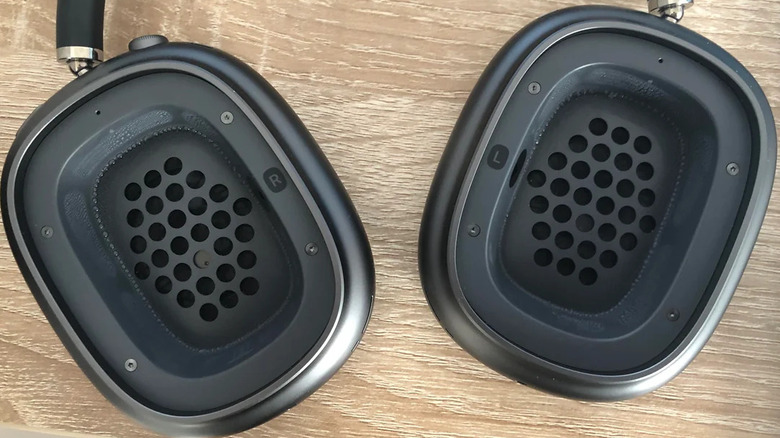
Start by removing the magnetic ear cushions. If you see visible droplets on the black driver mesh, use the microfiber cloth to gently dab the area. Do not rub, as this can push moisture through the mesh into the internal housing. For a more precise cleaning AirPods Max drivers routine, lightly dampen a cotton swab with 70% isopropyl alcohol. It is vital that the swab is damp, not dripping. Wipe around the edges of the driver housing, being careful not to let any liquid enter the small pinholes near the top of the earcup.
Expert Tip: When cleaning the driver area, hold the earcups upside down. This uses gravity to prevent any stray alcohol or moisture from flowing deeper into the sensor ports or the logic board connectors.
If your ear cushions have developed a musty smell due to moisture, you can clean them using a solution of 1 teaspoon of detergent to 1 cup of water. Gently scrub the mesh with a soft cloth, rinse with a damp cloth, and then—this is the most important part—allow them to dry for a full 24 hours.
Warning: The 24-Hour Drying Rule If you suspect moisture has entered the internal circuitry, do not attempt to turn on the headphones or connect them to a charger. Leave the earcups exposed (cushions off) in a dry area for at least 24 hours. Using a hair dryer is not recommended, as excessive heat can damage the acoustic adhesives.
Preventing Permanent Damage: Storage and Usage Tips
Maintaining a pair of $550 headphones requires a shift in habits, especially if you live in a humid climate or move between extreme temperatures. The most effective method for AirPods Max preventative maintenance is controlling the environment when the headphones are not in use. The standard Apple Smart Case offers almost no protection against humidity; in fact, its open design can actually allow moisture to linger.
I highly recommend investing in a third-party hardshell zipper case. Inside this case, you should always keep a few silica gel packets. Using silica gel packets in airpods max case creates a micro-dehumidifier that pulls moisture out of the earcups while they sit on your desk or in your bag. This is especially important after a long listening session where your body heat has likely generated some level of internal condensation.
Another critical tip involves temperature acclimation. If you are moving from a cold, air-conditioned office into a humid outdoor environment, the thermal shock will trigger immediate AirPods Max condensation. Try to let the headphones stay in your bag for 15-20 minutes to slowly reach the ambient temperature before putting them on your head.
Furthermore, we must address the "gym" issue. Many users love the AirPods Max for their sound quality during workouts, but preventing airpods max moisture buildup while exercising is nearly impossible. The sheer volume of sweat and the increase in body temperature creates a "greenhouse effect" inside the aluminum cups. If you must use them for light activity, make it a habit to remove the ear cushions every 30 minutes to wipe away visible moisture.
Troubleshooting: When Moisture Becomes a Hardware Failure
Sometimes, despite our best efforts, the moisture reaches a critical point. You need to be able to identify the signs of permanent airpods max moisture damage before your warranty—or your window for an AppleCare+ claim—expires. One of the first symptoms is airpods max anc button not working condensation issues, where the button either fails to respond or triggers Transparency mode randomly.
Other common failure signs include:
- Frequent connectivity drops or "searching" for the iPhone even when nearby.
- A "crackling" sound in one ear during head movement.
- The "Automatic Head Detection" feature failing to pause music when the headphones are removed.
- The battery draining rapidly while the headphones are in the Smart Case.
If you encounter these issues, you may run into the AppleCare coverage "Warranty Trap." Many users have reported that when they take their headphones to the Genius Bar for condensation issues, Apple classifies it as "liquid damage." Because the AirPods Max have no water resistance rating, liquid damage is typically not covered under the standard one-year limited warranty. If you have AppleCare+, the repair will likely cost a $29 deductible. Without it, you could be looking at a replacement cost of nearly $300.
Always document the presence of condensation with photos. If you see droplets, take a picture with your phone. Having a "paper trail" of the issue can be incredibly helpful if you ever need to participate in a future service program or legal settlement related to the aluminum earcups design.
FAQ
Is condensation in AirPods Max normal?
While it is "normal" in the sense that it happens to a large number of users due to the physics of aluminum earcups, it is not an intended feature of the product. It is a design byproduct that can lead to hardware failure if not managed.
How do I prevent condensation in my AirPods Max?
The best prevention strategies include using silica gel desiccant packets in a sealed carrying case, avoiding high-intensity exercise while wearing them, and allowing the headphones to acclimate when moving between different temperature environments.
Can moisture inside AirPods Max cause damage?
Yes, moisture can lead to hardware corrosion on the logic board and sensor arrays. This often manifests as sensor failure, button unresponsiveness, or a total loss of connectivity, commonly referred to as condensation death.
Does Apple's warranty cover water damage from condensation?
Typically, the standard one-year limited warranty does not cover liquid damage. Since AirPods Max have a zero water resistance rating, Apple often classifies condensation issues as out-of-warranty liquid damage, though AppleCare+ users can get a replacement for a small deductible.
How do I clean condensation out of my AirPods Max?
Remove the ear cushions and gently wipe the driver surface with a dry, lint-free cloth. For deeper cleaning, use a cotton swab lightly moistened with isopropyl alcohol, then allow the earcups to air-dry with the cushions off for at least 24 hours.