Quick Facts
- Risk Level: Significant safety concern at highway speeds due to unexpected deceleration.
- Primary Cause: AI misinterpretation of visual data such as overpass shadows or road geometry.
- Immediate Fix: Manual accelerator input to override the system is the most effective driver response.
- Modern Hardware: Hardware 4 and FSD v13 show measurable reductions in false-positive braking events.
- Investigation Status: The NHTSA probe covers approximately 416,000 Tesla vehicles following hundreds of owner reports.
- Best Practice: Keeping the camera suite clean and reporting incidents via voice commands helps train the neural network.
Phantom braking occurs when Tesla's Autopilot or Full Self-Driving systems unexpectedly apply the brakes due to misinterpreted visual data. To manage this effectively, drivers should maintain a hover-ready foot position over the accelerator to override the deceleration instantly while ensuring their cameras remain clean and software is updated to the latest version.
The 'Hover-Ready' Response: Overriding Sudden Deceleration
When you are behind the wheel of a Tesla using active safety systems, your role shifts from a traditional driver to a vigilant supervisor. The most critical skill in your repertoire for 2026 is the hover-ready posture. This physical technique involves keeping your right foot positioned directly over the accelerator pedal, even when Traffic-Aware Cruise Control is handling your speed. Because automatic emergency braking malfunctions can occur in a split second, having your foot already in place eliminates the reaction time required to move from the floor to the pedal.
If you feel the car begin to nose-dive without a clear hazard in front of you, apply steady pressure to the accelerator. This manual intervention tells the computer that you, the human pilot, have verified the path is clear. Overriding driver assistance systems in this manner does not disable the safety features permanently; it simply tells the car to ignore the specific phantom threat it thinks it sees.
Beyond the immediate physical override, maintaining a safe following distance is your best defense against a tesla rear end collision risk from phantom braking. If your car slows down abruptly, the driver behind you needs ample time to react. By increasing the gap between you and the lead car, you provide a buffer that accounts for both your car’s unexpected behavior and the reaction time of surrounding traffic. This proactive approach turns a potentially dangerous highway incident into a minor, manageable glitch.
Understanding Tesla Vision in 2026: Triggers and Causes
To solve the puzzle of why your car suddenly slows down, we have to look at how visual perception AI interprets the world. Tesla Vision relies entirely on cameras, moving away from the radar sensors used in older models. While this mimics human sight, it also introduces human-like errors. The software can struggle with edge case scenarios where environmental factors create optical illusions. For example, the dark, rectangular shadow cast by an overpass on a bright afternoon can look like a solid object to the vehicle's cameras.
The move toward tesla vision phantom braking causes 2026 to be a year of transition. Tesla is increasingly using End-to-End Neural Networks, which move away from hard-coded "if-then" rules toward a system that learns from millions of miles of human driving data. In older software versions, road geometry—such as a sharp curve with a metal guardrail—could trigger a false positive because the system misinterpreted the reflection as a vehicle in the path.
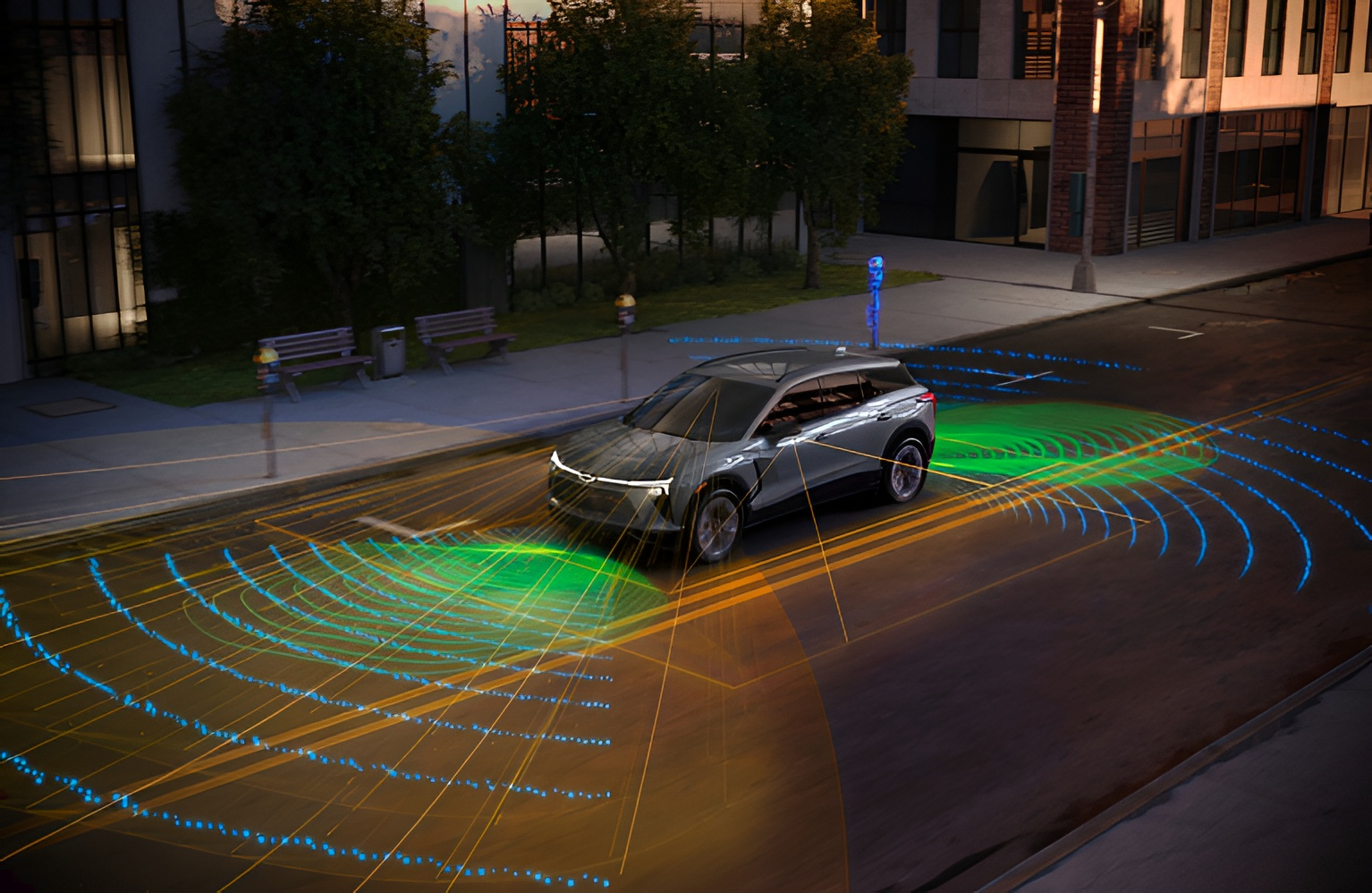
With the rollout of FSD v13, the system is better at distinguishing between actual obstacles and atmospheric interference. However, certain triggers remain. Large trucks in adjacent lanes, flickering LED signs, and even heavy rain can still confuse the visual perception AI. Understanding that your car is essentially a high-speed computer trying to solve a 3D puzzle in real-time helps you anticipate when it might fail, particularly when lighting conditions are challenging or the road layout is non-standard.
Hardware 4 vs. HW3: Is the 2026 Fix Finally Here?
If you are driving a 2026 Highland Model 3 or a Juniper Model Y, you are benefiting from Hardware 4 Capabilities that significantly outpace the previous generation. The shift from Hardware 3 to Hardware 4 (HW4) isn't just about faster processing; it's about the quality of the "eyes" the car uses. HW4 cameras feature significantly higher resolution and better dynamic range, which allows the car to see through the glare of a setting sun or distinguish details in deep shadows that would have appeared as solid black blobs to older sensors.
The tesla hw4 phantom braking improvements fsd v13 brings to the table are rooted in how the car processes fleet data. Because the HW4 computer can handle more complex neural networks, it can run more sophisticated validation checks before deciding to hit the brakes. While HW3 models must sometimes make "conservative" guesses to ensure safety, HW4 has the computational headroom to be more precise.
However, it is important to note that while the frequency of incidents has dropped on newer hardware, it has not reached zero. The 2026 software updates focus heavily on smoothing out the braking profile. Instead of a violent "slamming" of the brakes, newer versions of FSD v13 are designed to initiate a gentler deceleration if the system is uncertain, giving the driver more time for manual intervention. If you are considering an upgrade, the enhanced sensor suite on the newest models is currently the most robust hardware-based defense against these visual glitches.
Maintenance Guide: Camera Recalibration and Cleaning
Many drivers overlook the fact that phantom braking can be a hardware maintenance issue rather than just a software bug. Because Tesla Vision relies on clear sightlines, even a small smudge of road salt or a dead insect on a camera lens can distort the visual data. For owners of newer models, paying special attention to the front-facing cameras located at the top of the windshield and the side-pillar cameras is essential.
To keep your system running at peak performance, follow these steps:
- Use a high-quality glass cleaner and a microfiber cloth to wipe down all eight camera housings.
- Check for internal condensation within the B-pillar camera housings, which can occur in humid climates.
- If you notice a sudden increase in braking incidents, perform a camera recalibration via the touchscreen: Controls > Service > Camera Calibration. Note that this will require you to drive on well-marked roads for 10-25 miles while the system re-learns its environment.
Pro Tip: Use the Voice Command Reporting Feature Whenever you experience a phantom event, immediately press the right scroll wheel on your steering wheel and say, "Report bug: phantom braking." This triggers a data snapshot that is sent to Tesla’s engineering team. This simple act provides the raw data needed for fleet data training, helping the neural network learn to ignore that specific shadow or bridge in the future.
By cleaning tesla cameras to stop phantom braking, you ensure that the input data is as clean as possible. A dirty camera is like driving with a smeared pair of glasses; it makes it much harder for the visual perception AI to make the right call in complex road geometry situations.
Regulatory Context: The NHTSA Tesla Investigation
While individual driver tips are helpful, the broader issue of phantom braking has caught the attention of federal regulators. The National Highway Traffic Safety Administration (NHTSA) opened a formal investigation, identified as PE 22-002, to look into the safety implications of these sudden stops. This NHTSA Tesla investigation was triggered after the agency received 758 consumer complaints regarding unexpected brake activation as of mid-2022.
The scope of the probe is massive, involving hundreds of thousands of vehicles. Regulators are specifically looking at how the car handles automatic emergency braking malfunctions when there is no actual threat present. While Tesla has been the most visible target of these inquiries, they are not alone. Other automotive giants, including Nissan, Ford, and Toyota, have also had to address similar issues with their active safety systems.
The phantom braking nhtsa tesla investigation updates suggest that regulators are pushing for more transparent reporting and faster software patches. For the consumer, this means that the pressure is on Tesla to refine its safety-critical software. The data gathered from these investigations often leads to mandatory over-the-air updates that improve the logic behind how the car reacts to bridge shadows and other common triggers. Staying informed about these regulatory shifts helps you understand that this is a known industry challenge, not just a quirk of your specific vehicle.
FAQ
What is phantom braking and why does it happen?
Phantom braking is a phenomenon where a vehicle's driver assistance system suddenly applies the brakes without an actual obstacle in the road. It happens because the car's sensors and computer misinterpret environmental factors, such as shadows, reflections, or road signs, as a collision risk.
Is phantom braking dangerous on the highway?
Yes, it can be dangerous because it involves sudden, heavy deceleration in high-speed traffic. The primary risk is being rear-ended by a following vehicle that does not expect your car to stop or slow down rapidly when the path ahead is clear.
How can I stop my car from phantom braking?
While you cannot disable the underlying AI logic, you can reduce incidents by keeping your cameras clean, ensuring your software is updated to the latest version, and performing a camera recalibration if errors persist. Using the accelerator pedal to override the system when it starts to slow down is the best way to manage it in the moment.
Can phantom braking lead to rear-end collisions?
Yes, it creates a significant risk of rear-end collisions. Because the braking is often more aggressive than a human would naturally apply in those conditions, drivers following behind may not have enough time or distance to stop safely.
Can software updates fix phantom braking?
Software updates are the primary way these issues are resolved. Versions like FSD v13 use improved neural networks to better distinguish between real threats and false positives. While updates have significantly reduced the frequency of these events, they have not yet completely eliminated them across all driving scenarios.