Quick Facts
- Direct Answer: To perform an HDMI passthrough setup, connect your source to the sound device's input and the output to your TV, then enable 'Standby Passthrough' in the HDMI settings menu.
- Bandwidth Requirement: HDMI 2.1 technology increases maximum uncompressed bandwidth to 48 Gbps, making it essential for 4K/120Hz and VRR performance.
- Audio Standard: eARC is required for lossless Atmos as it offers 37 Mbps of audio bandwidth.
- Power Efficiency: Using AV receiver standby passthrough increases standby power consumption slightly to keep the HDMI board active.
- Brand Note: Different manufacturers use varied terminology; for instance, Denon refers to this feature as Main Zone Standby.
To configure an HDMI passthrough setup, connect your media source to the HDMI input of your AV receiver or soundbar and the output to your TV. Access the device settings menu—often found under Video or HDMI Setup—and enable the passthrough or standby mode. This allows the audio and video signals to reach the display even when the sound system is powered off, enabling you to use TV speakers for late-night viewing.
The "Quiet Night" Scenario: Why Passthrough Matters
Imagine it is 11:30 PM. The rest of the house is asleep, and you want to catch up on a few episodes of a show or finish a gaming level. Powering up your 7.1.4 channel home theater system with dual subwoofers isn't just overkill; it is an invitation for a noise complaint from your spouse or neighbors. This is where an effective HDMI passthrough setup becomes your best friend.
By enabling the signal to bypass the amplification stage of your receiver or soundbar while the unit is in standby, you can route audio directly to your TV speakers. It is the ultimate convenience feature for modern living, balancing high-end performance with real-world practicality. But getting the signal to flow perfectly involves more than just plugging in a cable; it requires understanding the digital handshake between your devices.
Understanding the 'HDMI Chain': Hardware & Cables
When we talk about an audio system, we often focus on the speakers. However, in a digital ecosystem, your system is only as strong as its weakest link. This is what I call the HDMI Chain. To achieve a seamless signal bypass, every component—from your PS5 to your receiver to your 8K display—must speak the same language.
The modern standard is HDMI 2.1. This specification is a massive leap forward, as HDMI 2.1 technology increases maximum uncompressed bandwidth to 48 Gbps. This bandwidth is what allows for 4K resolution at a 120Hz refresh rate, a necessity for competitive gaming. If you are trying to set up 8k video passthrough for home theater, you cannot cut corners on your wiring. You must use ultra-high-speed cables specifically certified for 48 Gbps. If you use an older High Speed cable (18 Gbps), you might get a picture, but you will likely experience blackouts or a forced downgrade to 4K/60Hz.
It is also important to distinguish between signal bypass and active decoding. When your receiver is on, it is actively "stripping" the audio from the HDMI signal to process it through its DAC (Digital-to-Analog Converter) and amplifiers. When you enable AV receiver standby passthrough, the device essentially acts as a transparent bridge, handing the untouched digital bitstream over to the TV. To ensure you have the best HDMI cables for 4k 120hz passthrough setup, look for the "Ultra High Speed" hologram on the packaging.
Setup Guide: Enabling Passthrough on Receivers and Soundbars
Configuring your hardware can feel like navigating a maze of menus. Most manufacturers hide these settings under power management or video options to save energy out of the box. Here is a breakdown of how to navigate the most popular brands.
AV Receiver Configurations
For a Denon or Marantz receiver, the path is usually found under Setup > Video > HDMI Setup. Here, you will find an option for HDMI Pass Through. You must turn this On. Additionally, look for Pass Through Source. You can set this to Last (which uses the last active input) or a specific input like CBL/SAT or Game. This ensures that even when the receiver is off, the signal from that specific device reaches the TV.
On Yamaha receivers, the setting is often located in the Setup > HDMI > Standby Through menu. Switching this to On or Auto allows the video signal to flow through while the unit sleeps.
Soundbar and TV Integration
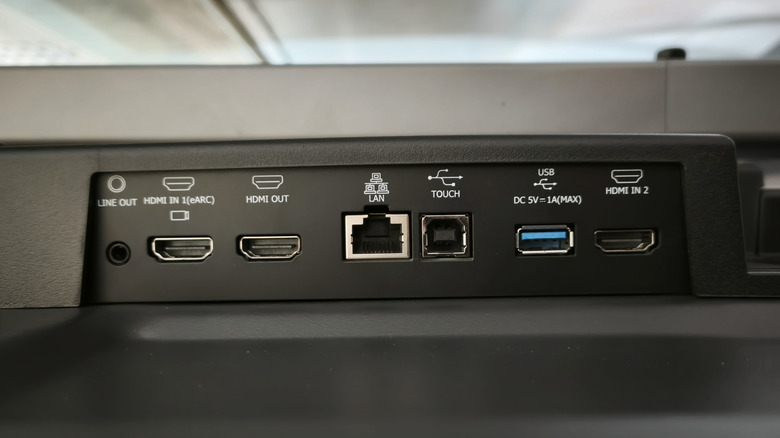
If you are working with a soundbar HDMI passthrough settings, the physical connection is the first step. You should connect your external device (like an Apple TV 4K) to the HDMI In port on the soundbar, and then connect the soundbar's HDMI Out (ARC/eARC) port to the TV.
On the TV side, particularly for LG OLED owners, you need to ensure the TV is ready to receive the raw signal. Navigate to All Settings > Sound > Advanced Settings. Ensure that Digital Sound Out is set to Pass Through. This prevents the TV from trying to re-process the audio, which is vital for maintaining a digital bitstream without lag.
Strategy: 4K/120Hz Gaming vs. Lossless Cinematic Audio
One of the most common questions I get is whether to connect the source to the TV first or the receiver first. This decision depends entirely on your hardware’s capabilities.
If you are a gamer, you likely want an HDMI passthrough 4k 120hz setup for ps5 or Xbox Series X. If your receiver is older and only supports HDMI 2.0, connecting the console to the receiver will cap your frame rate at 60Hz. In this scenario, you should connect the console directly to the TV to keep the 120Hz and Variable Refresh Rate (VRR) features. You then use the eARC port to send the audio back down to the soundbar.
However, if you are a cinephile, you want the highest quality audio possible. HDMI eARC supports high-bitrate, lossless audio formats such as Dolby TrueHD and DTS-HD Master Audio. Older ARC connections are limited.
| Feature | HDMI ARC | HDMI eARC |
|---|---|---|
| Max Bandwidth | 1 Mbps | 37 Mbps |
| Compressed 5.1 | Yes | Yes |
| Uncompressed 7.1 | No | Yes |
| Dolby Atmos (Lossless) | No | Yes (via Dolby TrueHD) |
| DTS:X | No | Yes |
For those using a soundbar HDMI passthrough vs eARC connection guide, remember that many modern TVs (like those from LG and Samsung) no longer support DTS encoding. If you connect a Blu-ray player to an LG TV and try to send audio to a soundbar via eARC, you might get no sound for DTS discs. In this case, connecting the player directly to the soundbar’s HDMI input (passthrough) is the only way to hear your movie.
Troubleshooting: Audio Lag and No Sound Issues
Even with the best gear, things can go wrong. The most frequent complaint is audio lag, where the sound doesn't match the actors' lips. This usually happens when the TV or receiver is trying to "process" the audio.
To fix HDMI passthrough input lag for gaming, go into your console settings and change the audio format to Linear PCM or Bitstream. PCM is uncompressed and usually has the lowest latency. If you are experiencing troubleshooting HDMI passthrough no sound on TV issues when the receiver is in standby, double-check the Standby Source setting in your receiver. If it is set to a specific input but you are trying to watch a different one, the TV will receive no signal.
Another common hurdle is HDCP (High-bandwidth Digital Content Protection). If you are trying to pass 4K HDR content through a receiver that only supports HDCP 1.4, you will get a black screen or a 1080p downscaled image. Ensure all devices in your chain support HDCP 2.2 or higher for 4K flow. If you are still seeing issues, a simple "handshake" reset—unplugging all HDMI cables and power cords for 60 seconds—can often clear the digital communication errors.
FAQ
What is HDMI passthrough and how does it work?
HDMI passthrough is a feature that allows an audio device, like a receiver or soundbar, to take an incoming HDMI signal and pass the video and audio data directly to the TV without processing it or requiring the audio device to be fully powered on. It works by maintaining an active electrical bridge on the HDMI circuit board even when the main amplification components are in standby mode.
How do I set up HDMI passthrough on a soundbar?
To set this up, connect your media player (like a Roku or Blu-ray player) to the HDMI IN port on the back of your soundbar. Then, connect the HDMI OUT port of the soundbar to the HDMI ARC/eARC port on your TV. Finally, enter the soundbar's settings menu or use the remote to ensure that HDMI-CEC or Standby Passthrough is enabled.
Does HDMI passthrough support 4K and HDR content?
Yes, but it is dependent on the hardware version of the passthrough device. If your soundbar or receiver supports HDMI 2.0 or 2.1, it can pass through 4K, HDR10, and Dolby Vision HDR signals. If the device is older (HDMI 1.4), it may be limited to 1080p or 4K at only 30Hz without HDR support.
Why is my HDMI passthrough not producing sound?
This often happens because the Standby Source is not set correctly in your receiver's menu, or the TV is not set to receive the correct audio format. Ensure the TV's audio input is set to HDMI and the receiver is configured to pass the signal from the specific input you are using while in standby mode. Also, check that HDMI-CEC (Anynet+, Bravia Sync, etc.) is enabled on both the TV and the audio device.
Do I need specific HDMI cables for passthrough setup?
While standard cables work for basic 1080p, high-performance setups require specific cables. For 4K/60Hz with HDR, you need Premium High Speed (18 Gbps) cables. For 4K/120Hz or 8K video, you must use Ultra High Speed (48 Gbps) cables to ensure the signal doesn't drop out during the passthrough process.
What is the difference between HDMI passthrough and HDMI ARC?
HDMI passthrough involves sending a signal from a source through an audio device to the TV. HDMI ARC (Audio Return Channel) does the opposite; it sends audio from the TV (like built-in apps) back down the same cable to the soundbar or receiver. Passthrough is generally preferred for high-bitrate lossless audio because it avoids the processing limitations found in some TV software.