Quick Facts
- Availability: Individual replacements are sold at Samsung service centers in Australia and Singapore, but are usually restricted to third-party marketplaces in North America.
- Cost Comparison: Expect to pay between $60 and $140; for flagship models, a single unit can cost as much as a new pair on sale.
- Model Specificity: Replacement units must match the exact generation and side (Left or Right) to enable stereo features and Active Noise Cancellation (ANC).
- Pairing Method: Syncing requires placing both units in the case and holding the touchpads for seven seconds until the light flashes green.
- Best Third-Party Sources: Reliable options include eBay and specialized retailers like Re-Cell Exchange when official channels are unavailable.
Lost one of your Samsung earbuds? Don't buy a whole new set yet. Finding a Galaxy Buds replacement for a single side is possible and can save you significant money. Whether you need to replace a single Samsung earbud for the Buds2 Pro or the new Buds3, this guide covers official regional policies, where to buy individual Galaxy Buds online, and how to sync your new hardware.
Pre-Purchase Check: Finding and Identifying Your Buds
Before you open your wallet, try one last search using the Galaxy Wearable app. The Find My Earbuds feature can trigger a loud beeping sound if the earbud is still within a 32-foot Bluetooth range and has some battery remaining. If that fails, you need to be absolutely certain about which model you own. Samsung has released several generations that look similar but use different internal hardware, meaning you cannot pair a Buds2 earbud with a Buds2 Pro case.
Identifying the correct hardware is essential because components are not interchangeable. For instance, replacing a lost galaxy buds 3 pro earbud requires the specific stem-style unit released in 2024, which will not sync with the older, bean-shaped Buds Live case. To find your model number, check the original box or go to About earbuds in the Galaxy Wearable app.
| Release Year | Model Name | Distinctive Shape |
|---|---|---|
| 2020 | Galaxy Buds Live | Unique bean shape |
| 2021 | Galaxy Buds2 | Smooth, round, glossy finish |
| 2022 | Galaxy Buds2 Pro | Matte finish, compact round shape |
| 2023 | Galaxy Buds FE | Wing-tip design |
| 2024 | Galaxy Buds3 / Pro | Stem-based (Open-fit or In-ear) |
Where to Buy: Official vs. Third-Party Marketplace
Finding where to buy a single Galaxy Buds replacement depends heavily on where you live. If you are in Australia or Singapore, you are in luck. Samsung authorized service centers in these regions often stock individual earbuds. You can typically walk in, provide your case, and purchase the specific side you need.
In North America and parts of Europe, Samsung generally directs customers to buy a completely new retail set. However, a thriving secondary market has emerged to fill this gap. Third-party marketplaces like eBay are the most common source for buying a used galaxy bud left or right replacement. These are often units from sets where the other earbud or case was lost, then salvaged and cleaned for resale.
For a more curated experience, specialized retailers like Re-Cell Exchange focus specifically on individual earbud replacements. This is often safer than a random eBay listing because they typically test the battery health and sanitize the units before shipping. When doing a samsung galaxy buds replacement earbud price comparison, keep in mind that official Samsung authorized service centers may charge over $140 for a single replacement earbud for premium models like the Galaxy Buds 2 Pro. Given that a brand-new pair often goes on sale for $160, you should weigh whether buying individual Galaxy Buds is truly the most cost-effective path.
How to Sync Your New Replacement Earbud
Once your new earbud arrives, it won't work with your existing one immediately. They are essentially strangers that need to be formally introduced through a coupling procedure. This process links the two units so they can communicate to provide stereo sound and Active Noise Cancellation (ANC).
Follow these steps to sync replacement Galaxy Bud hardware:
- Insert both the original and the replacement earbud into the charging case.
- Check that the indicator light on the case flashes to show they are seated correctly.
- Using two fingers, simultaneously touch and hold the touchpads on both earbuds.
- Keep holding for at least seven seconds.
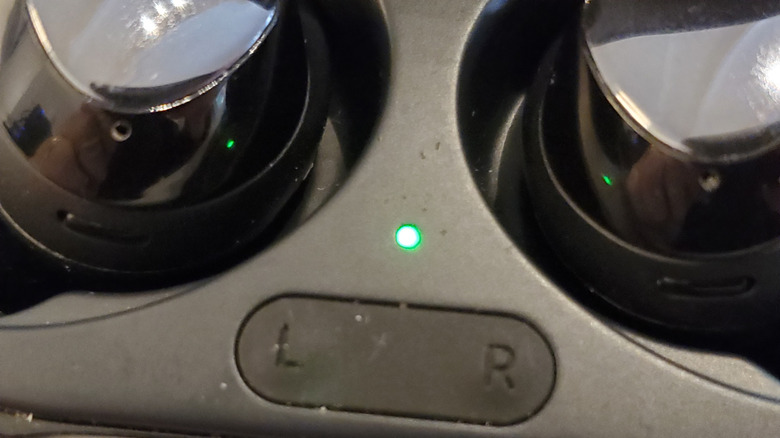
- The indicator light on the case will begin to flash green. This confirms the pairing process is successful.
- Once the light returns to a steady color, open the Galaxy Wearable app on your phone to finish the setup.
If you have trouble with the touchpads not responding, ensure you haven't enabled the Block touches feature in the app settings previously. If you have, you may need to reset the earbuds through the app menu while they are connected. After the physical coupling is done, always check for firmware updates. A version mismatch between the left and right sides can cause connectivity drops or uneven volume.
Troubleshooting: What the LED Lights Mean
The small LED on your charging case is your primary source of feedback during the syncing process. Understanding these signals can help you identify if the earbuds are successfully communicating or if there is a hardware mismatch.
LED Indicator Meanings
- Steady Green: The earbuds are fully charged and successfully coupled.
- Steady Red/Orange: The earbuds are charging.
- Flashing Red: This is the most common error during syncing. It indicates that the earbuds are not properly seated, or more likely, that the coupling procedure failed because the two buds are not compatible models.
- Flashing Green: This is the "handshake" signal. It means the earbuds are currently in the process of pairing a new galaxy bud with an existing one.
If you see the syncing replacement galaxy buds case light flashing red even after multiple attempts, try cleaning the charging contacts on both the earbuds and the case with a small amount of isopropyl alcohol and a cotton swab. A poor connection is often the culprit for a failed sync.
FAQ
Can I buy a single Galaxy Bud replacement?
Yes, you can buy a single Galaxy Bud replacement. While Samsung's official policy on selling individual units varies by country, you can almost always find individual left or right earbuds through reputable third-party sellers and specialized electronics recyclers.
How much does it cost to replace one Galaxy Bud?
The cost generally ranges from $60 for older or base models to $140 for flagship models like the Buds2 Pro. In many cases, the price of a single replacement earbud at an authorized center is nearly the price of a new pair on sale, so always check retail discounts before buying a single unit.
How do I pair a replacement Galaxy Bud with my existing set?
To pair them, place both the old and new earbuds in the charging case. Press and hold the touchpads on both earbuds simultaneously for seven seconds. You will see the case light flash green, indicating that the two units are being coupled together as a new pair.
Does the warranty cover lost Galaxy Buds?
No, the standard Samsung manufacturer warranty does not cover lost or stolen items. It only covers factory defects in materials or workmanship. However, if you have a premium protection plan like Samsung Care+, you may be eligible for a discounted replacement, depending on your specific policy terms.
How do I sync a new replacement earbud to the original case?
How to buy a single samsung galaxy bud replacement is only half the battle; you must sync it by placing both buds in the case and performing the 7-second hold on the touchpads. Once the light flashes green, the earbuds are synced to each other and will work with the original case as a single unit.
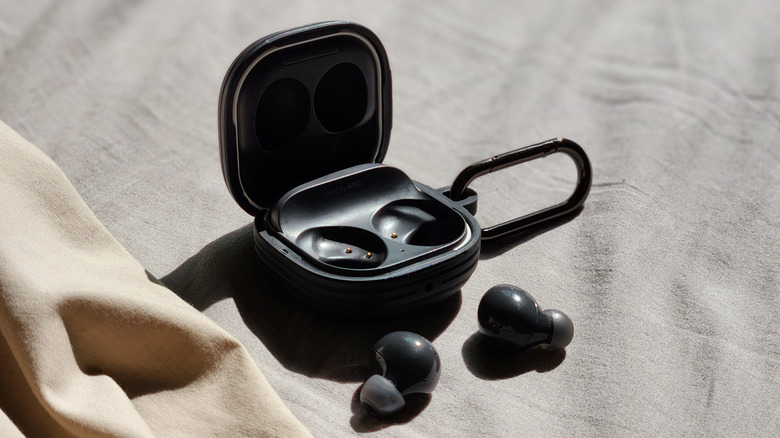
As a final tip for the future, consider adding a small silicone case with a carabiner to your charging case. Most "lost bud" stories I hear start with a case accidentally popping open after being dropped on the pavement. A little extra physical security can save you the headache of another Galaxy Buds replacement search down the road.