Our Top Picks
The Huawei WiFi Mesh X3 Pro is the ultimate solution for those who prioritize aesthetics without sacrificing cutting-edge connectivity. It is our top recommendation for modern, minimalist homes where traditional routers would look out of place. While it lacks a 6 GHz band, its unique ambient lighting and high-speed Wi-Fi 7 capabilities make it a standout choice for high-end interior design projects.
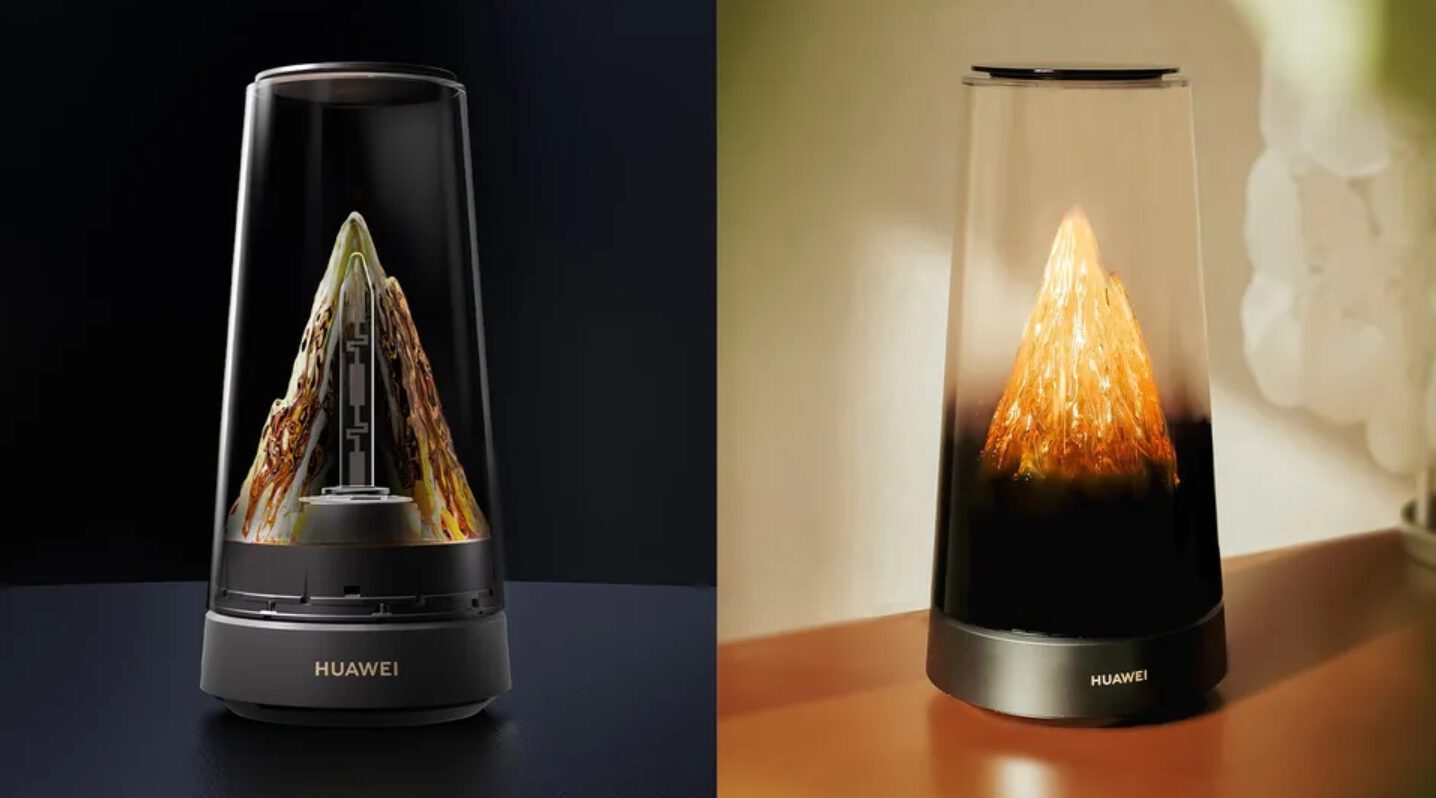
The Huawei WiFi Mesh X3 Pro is a Wi-Fi 7 mesh router that doubles as a decorative home accessory. It features a unique mesh crystal antenna design with an amber-colored glow that mimics a snow-capped mountain. Beyond aesthetics, it utilizes a Gigahome SoC to deliver theoretical dual-band speeds up to 3570 Mbps while incorporating a specialized shark fin heat exhaust system for advanced thermal management.
Design: More Than Just a Router
For years, the smart home industry has struggled with the "ugly hub" problem—the necessity of placing plastic boxes with blinking lights in the middle of our living spaces. The Huawei WiFi Mesh X3 Pro effectively ends this era by transforming the router into an objet d'art. This piece of decorative smart home networking hardware replaces the traditional external antennas with an internal "invisible" array carved into a crystal dome.
The most striking feature is the Golden Mountain Glow, a lighting effect inspired by the sun hitting a snow-capped peak. This amber crystal finish provides a warm, sophisticated ambiance that feels more like a luxury candle or a minimalist lamp than a piece of networking equipment. In my experience with interior design integration, finding technology that complements a clean, Scandinavian, or modern industrial aesthetic is rare, but this router manages to become a living room centerpiece rather than something to be hidden in a cabinet.
Jessica’s Design Tip: Place the Huawei WiFi Mesh X3 Pro on a wooden sideboard or a marble entryway table. The warm amber glow reflects beautifully off natural surfaces, turning your connectivity hub into a conversation starter.
Customization is a major part of the appeal. Through the app, you can learn how to customize Huawei WiFi Mesh X3 Pro ambient lighting to match your mood or the time of day. You can even sync the light to reflect real-time local weather or schedule it to dim completely at night, ensuring your minimalist home tech never disrupts your sleep.
Performance Engineering: The Shark Fin Cooling System
While the exterior is all about grace, the interior is built for power. The Huawei WiFi Mesh X3 Pro is powered by a Gigahome SoC designed to handle the increased data loads of the Wi-Fi 7 standard. One of the most critical engineering feats here is the shark fin cooling system. Wi-Fi 7 chips generate significant heat, and traditional passive cooling often leads to thermal throttling. The Huawei WiFi Mesh X3 Pro shark fin cooling for gaming and heavy streaming ensures that the device maintains peak performance without the need for loud, intrusive fans.
When discussing performance, we must address the dual-band vs tri-band Wi-Fi 7 comparison. Unlike some ultra-premium competitors that offer a 6 GHz band, the X3 Pro operates on a dual-band configuration (2.4 GHz and 5 GHz). This leads to a dual-band vs tri-band Wi-Fi 7 router performance comparison where the X3 Pro might show more congestion in extremely dense urban environments. However, it compensates by utilizing 4K-QAM technology, which enhances data encoding efficiency by approximately 20% over previous standards, reaching theoretical speeds of 3570 Mbps.
| Setup | Coverage (Approx.) | Ideal For |
|---|---|---|
| Single Unit | 120-150 sqm | Large Apartments / Open-plan Lofts |
| Dual Unit | 240-300 sqm | Two-story Suburban Homes |
| Triple Unit | 450+ sqm | Large Estates / Multi-story Villas |
Smart Connectivity: PLC 3.0 and Game Turbo
One of the common challenges in aesthetic Wi-Fi 7 routers for modern living rooms is signal penetration through thick walls. Huawei solves this by implementing a hybrid backbone. The system uses both wireless signals and PLC 3.0 (Powerline Communication), which turns your home’s electrical wiring into a data highway. This ensures that even if you are three rooms away from the main unit, the connection remains stable.
For the gamers in the house, the router includes a dedicated Game Turbo mode. This feature recognizes when a gaming console or PC is active and prioritizes that traffic, resulting in a 37% latency reduction across over 90 popular titles. This makes the Wi-Fi 7 mesh router design as functional for a high-intensity match as it is beautiful for a cocktail party.
When looking at a Huawei WiFi Mesh X3 Pro vs MSI Roamii BE Pro comparison, the Huawei model wins on sheer elegance and lighting integration, while the MSI might appeal more to those looking for a traditional "gamer" aesthetic. The X3 Pro also supports Multi-Link Operation, a core Wi-Fi 7 feature that allows devices to connect to both the 2.4 GHz and 5 GHz bands simultaneously to increase throughput and reduce interference.
Setup and Ecosystem: The HUAWEI AI Life Experience
The setup process is remarkably simple, designed for users who want technology to "just work." By using the HUAWEI AI Life App, you can scan a QR code and have your entire mesh network running in under five minutes. The app provides 3D signal heat maps, allowing you to visualize exactly where your Wi-Fi signal is strongest and where you might have "dead zones."
Finding the best placement for mesh routers in open-plan homes is made much easier with these visual tools. You can move the node, refresh the map, and immediately see the impact on your coverage. This data-driven approach ensures that your beautiful router is also placed in the most effective location for your specific floor plan. It is worth noting that Huawei's dominance in the networking sector is well-documented; according to IDC's Worldwide Quarterly Wireless LAN Tracker, Huawei ranked first globally in enterprise-class Wi-Fi 7 market share throughout 2024, bringing that professional-grade stability into the home.
FAQ
What are the key features of the Huawei WiFi Mesh X3 Pro?
The router features a Wi-Fi 7 dual-band configuration with speeds up to 3570 Mbps, a unique crystal dome design with Golden Mountain Glow ambient lighting, and a shark fin cooling system. It also supports PLC 3.0 for hybrid mesh networking and Multi-Link Operation for better device stability.
How do I set up the Huawei WiFi Mesh X3 Pro system?
Setup is handled through the HUAWEI AI Life App. Simply plug in the router, connect your phone to its default Wi-Fi, and follow the in-app instructions to configure your network. The app also allows you to create 3D heat maps of your home for optimal node placement.
What is the maximum speed of the Huawei WiFi Mesh X3 Pro?
The Huawei WiFi Mesh X3 Pro offers a theoretical maximum dual-band speed of 3570 Mbps. This is achieved through the combination of the 2.4 GHz and 5 GHz bands utilizing Wi-Fi 7 technologies like 4K-QAM.
What is the difference between the Huawei Mesh X3 and X3 Pro?
The Pro version typically features upgraded internal components, higher theoretical throughput, and more advanced thermal management like the shark fin exhaust system. The Pro model is specifically optimized for the higher demands of Wi-Fi 7 standards compared to the standard Mesh X3.
Is the Huawei WiFi Mesh X3 Pro worth buying for gaming?
Yes, thanks to its Game Turbo mode which can reduce latency by up to 37%. Its high-speed Wi-Fi 7 capabilities and stable hybrid backbone make it a strong contender for gaming, especially in homes where a wired Ethernet connection isn't feasible in every room.
Final Verdict: Art Meets Bandwidth
The Huawei WiFi Mesh X3 Pro is a rare example of a product that understands the modern homeowner. We no longer want to choose between a fast internet connection and a beautiful home. By prioritizing Wi-Fi 7 mesh router design that looks like a high-end decor piece, Huawei has created a category of its own.
While the dual-band vs tri-band Wi-Fi 7 comparison shows that power users might miss the 6 GHz band, the reality for most families is that 3570 Mbps is more than enough for 8K streaming, VR gaming, and dozens of smart home devices. The thermal management provided by the shark fin system ensures the device remains reliable for years, and the atmospheric lighting adds a layer of luxury that no other router on the market currently offers. If you are looking for a way to upgrade your home's "brain" while enhancing its beauty, the Huawei WiFi Mesh X3 Pro is an essential investment in minimalist home tech.