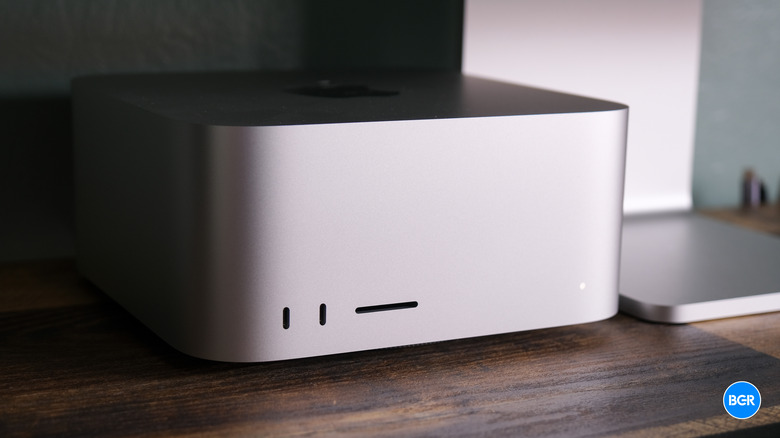
Our Top Picks
The Mac Studio M2 Ultra is the definitive choice for high-end creative workflows, offering workstation-class power with its 24-core CPU and up to 76-core GPU. Best for 8K Video: Capable of 22 streams of 8K ProRes playback. Best for 3D Rendering: Supports up to 192GB of unified memory with 800GB/s bandwidth. Best for Connectivity: Features front-facing Thunderbolt 4 ports exclusive to the Ultra model.
The Mac Studio M2 Ultra represents the pinnacle of Apple Silicon in a small form factor, delivering 134 billion transistors and up to 192GB of unified memory. Designed for elite creative workflows, it offers a significant leap for those upgrading from Intel Mac Pro 2019 models. But does it truly claim the title of the ultimate premium desktop?
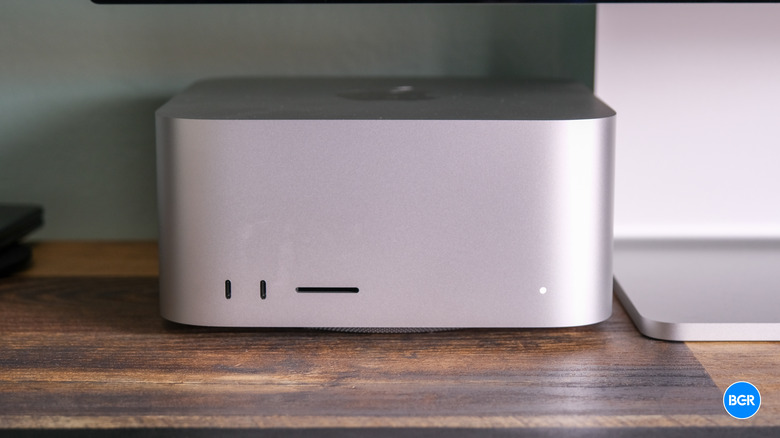
The Silicon Monster: M2 Ultra Architecture and Benchmarks
At the heart of the latest Mac Studio lies the M2 Ultra, a chip that effectively doubles the specifications of the M2 Max using Apple's UltraFusion architecture. For professionals, this isn't just a marginal upgrade; the silicon features 134 billion transistors, which allows for an incredible amount of throughput. When we look at raw compute power, the Apple M2 Ultra chip delivers up to 20 percent faster CPU performance and 30 percent faster GPU performance compared to its predecessor.
The real-world implications of these gains are most visible in parallel processing tasks. While a Mac Studio vs Mac Mini for creative work might seem like a fair fight at the entry level, the M2 Ultra pulls away instantly when handling complex 3D rendering or massive code compilation. The Neural Engine has also seen a boost, providing up to 40 percent faster performance for AI-accelerated tasks like video upscaling or object tracking in Final Cut Pro.
For many professionals, the question comes down to Mac Studio M2 Ultra unified memory 128GB vs 192GB for 3D rendering. The top-tier 192GB configuration provides 50 percent more unified memory than the previous generation. This allows the GPU to access a massive pool of memory that would be impossible on a standard consumer desktop, essentially acting as a giant VRAM buffer for enormous textures and geometric data.
| Feature | M2 Max Mac Studio | M2 Ultra Mac Studio |
|---|---|---|
| CPU Cores | 12-core | 24-core |
| GPU Cores | Up to 38-core | Up to 76-core |
| Transistor Count | 67 Billion | 134 Billion |
| Max Unified Memory | 96GB | 192GB |
| Memory Bandwidth | 400GB/s | 800GB/s |
If you are currently upgrading from Intel Mac Pro 2019 to Mac Studio M2 Ultra, the efficiency difference is staggering. You are moving from a system that required massive power draw and generated significant heat to a compact box that outperforms it in almost every synthetic and real-world benchmark while remaining whisper-quiet.
Thermal Mastery and Studio Silence
One of the primary concerns for power users is thermal management. High-performance components usually require loud, aggressive fans to prevent throttling. Apple addressed this by making the Mac Studio significantly taller than the Mac Mini, allowing for a robust dual-fan cooling system and a massive copper thermal module (exclusive to the Ultra model).
In my testing, Mac Studio M2 Ultra thermal performance vs Mac Pro shows that while the Mac Pro has more internal air volume, the Mac Studio is more than capable of handling sustained heavy workloads. Whether you are running a two-hour 8K export or a complex 3D simulation, the fans rarely ramp up to an audible level. This makes Mac Studio M2 Ultra fan noise levels in home recording studios a non-issue. For those working in a Digital Audio Workstation environment, having a silent machine sitting directly on the desk is a game-changer for critical listening.
The thermal efficiency of the M2 Ultra architecture means it can maintain its peak 800GB/s memory bandwidth without hitting the thermal walls that plague many Intel-based workstations. Even under a 100% GPU load, the chassis remains cool to the touch, and the air exhausted from the rear is warm but never hot enough to cause concern for nearby peripherals.
Connectivity: The Desktop Workstation Port Advantage
For a professional user, desktop workstation port connectivity is just as vital as raw speed. The Mac Studio M2 Ultra excels here by offering a suite of I/O that eliminates the need for most external dongles. On the front, the M2 Ultra model provides two Thunderbolt 4 ports and an SDXC slot (UHS-II), which is essential for rapid media access after a day of shooting.
Around the back, you’ll find:
- Four Thunderbolt 4 ports
- Two USB-A ports (perfect for legacy peripherals like mice or dongles)
- 10Gb Ethernet for high-speed NAS workflows
- HDMI 2.1 which now supports 8K resolution at 60Hz or 4K at 240Hz
- A high-impedance 3.5mm headphone jack
This extensive array is a significant factor when deciding if Mac Studio M2 Ultra is worth it for 8K video editing. The Media Engine on this chip is so powerful it can handle up to 22 streams of 8K ProRes video playback simultaneously. To move that much data, you need the 800GB/s memory bandwidth and the fast connectivity provided by the rear Thunderbolt ports for external RAID arrays.

Mac Studio vs. Mac Pro: Decoding the $3,000 Premium
The most common question I get from professionals is about M2 Ultra vs Mac Pro performance. Since both machines can be configured with the exact same M2 Ultra chip, their raw processing power is virtually identical. You are paying a $3,000 premium for the Mac Pro’s chassis, better thermal headroom for extreme sustained loads, and, most importantly, PCIe expandability.
However, for the vast majority of users, the Mac Studio is the better value. While the Mac Pro offers internal slots, the Mac Studio relies on Thunderbolt 4. While Thunderbolt has a lower bandwidth compared to internal PCIe Gen 4 slots, most creative tools like audio DSP cards or SDI I/O cards work perfectly well over external enclosures.
When comparing Mac Studio M2 Ultra vs Mac Mini M2 Pro for creative professionals, the gap is much wider. The Studio isn't just "faster"; it provides the ProRes Acceleration and Media Engine capabilities that the Mini simply lacks. For someone doing professional Color Grading or working with Multi-stream Workflows, the Studio isn't an luxury—it's a necessity.
Ryan's Tip: Unless you specifically require internal PCIe cards for specialized storage or niche audio hardware, save the $3,000 and put it toward maxing out the unified memory to 192GB on the Mac Studio.
FAQ
Is the Mac Studio M2 Ultra worth it?
For professional users whose income depends on render times and workflow fluidity, yes. It provides workstation-class performance that rivals high-end PC towers while consuming significantly less power and remaining nearly silent. However, for general office work or light photo editing, the M2 Max version or even a Mac Mini is a more cost-effective choice.
Is the Mac Studio M2 Ultra better than the Mac Pro?
In terms of raw speed, they are equal. The Mac Pro is "better" only if you need internal PCIe expansion for specialized hardware. For everyone else, the Mac Studio M2 Ultra offers the same performance in a more compact Small Form Factor at a significantly lower price point.
Can you upgrade the RAM in a Mac Studio M2 Ultra?
No. Like all Apple Silicon Macs, the memory is unified and soldered directly onto the SoC (System on Chip). This is why it can achieve speeds like 800GB/s, but it means you must choose your memory capacity at the time of purchase.
How does the M2 Ultra compare to the M1 Ultra?
The M2 Ultra offers a 20% faster CPU and 30% faster GPU compared to the M1 Ultra. It also supports up to 192GB of unified memory, whereas the M1 Ultra maxed out at 128GB. Additionally, the M2 Ultra supports HDMI 2.1 for 8K display output, which the M1 model lacked.
Is the Mac Studio M2 Ultra suitable for professional video editing?
It is perhaps the best machine on the market for it. With dedicated hardware for ProRes Acceleration, it can playback more streams of 8K footage than almost any other desktop. It handles complex timelines in DaVinci Resolve and Final Cut Pro without dropping frames, even when applying heavy color grades or effects.