Our Top Picks
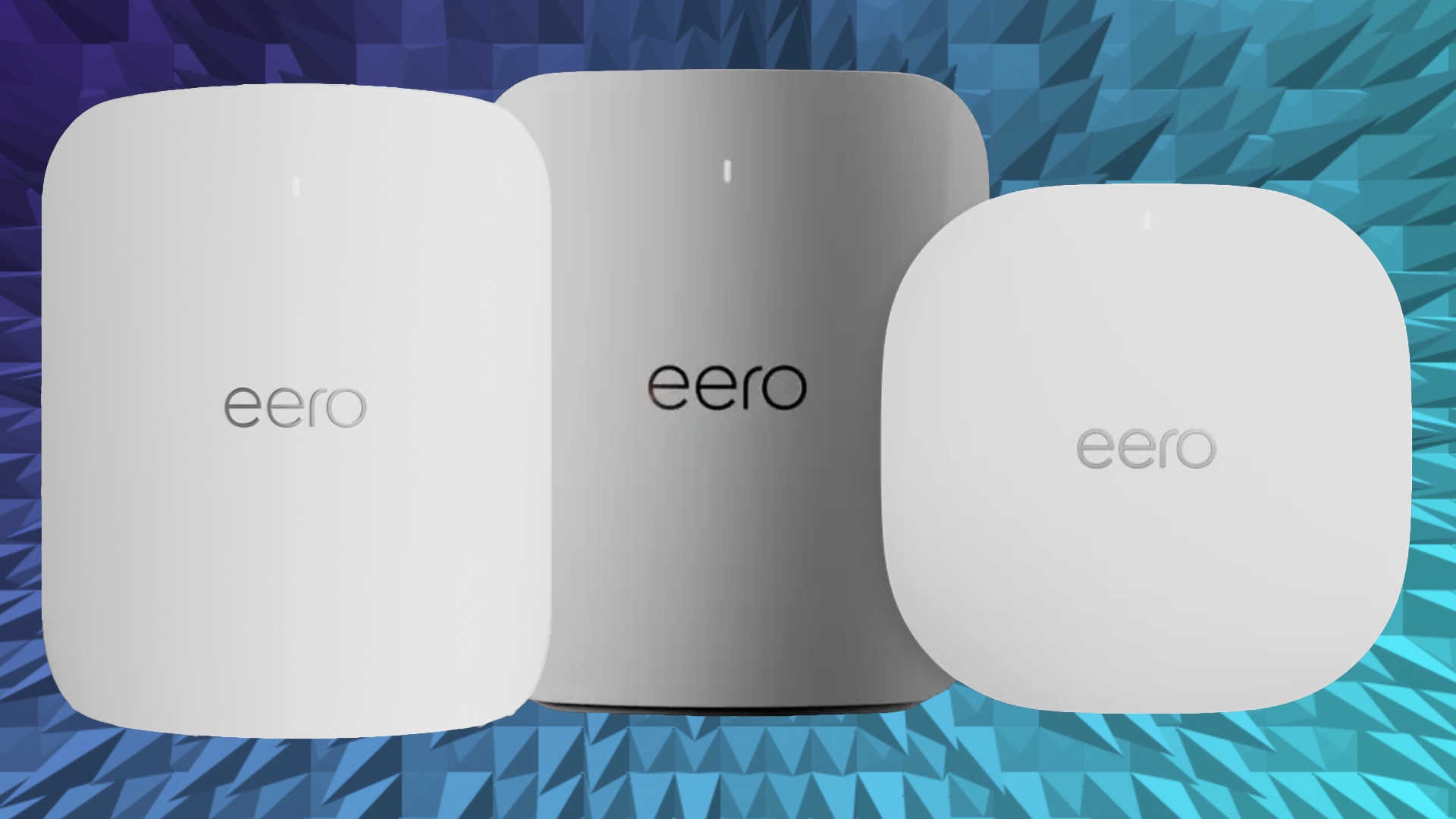
- Best for High-Bandwidth Homes: Eero Max 7. This is the ultimate choice for users with multi-gig fiber plans who need to eliminate every possible network bottleneck.
- Best All-Rounder: Eero Pro 7. The sweet spot for most modern smart homes, offering Wi-Fi 7 stability without the extreme price tag of the Max.
- Best for Entry-Level Mesh: Eero 7. A solid dual-band entry point for those beginning their Wi-Fi 7 journey in smaller spaces.
Real-world Eero Max 7 speed benchmarks with Ethernet backhaul show speeds exceeding 1.2 Gbps near nodes, making it the fastest mesh system for 2026 prosumer setups. This performance, validated in our Eero Max 7 review, ensures that the 6GHz spectrum is fully utilized to maintain throughput consistency across even the most demanding smart home ecosystem environments.
The Eero Max 7 is Amazon's most ambitious router yet, promising to eliminate network bottlenecks with Wi-Fi 7. In our testing, this tri-band powerhouse delivered unprecedented wireless throughput, but is it the right choice for your home? As an editor who spends more time troubleshooting Zigbee interference than I do sleeping, I’ve seen my fair share of mesh systems. But the Max 7 feels different—it’s built for a future where a 1Gbps connection is considered the slow lane.
Hardware Evolution: 10Gbps Ports and Physical Constraints
If you have been using the older Eero Pro 6E, the first thing you will notice about the Max 7 is its sheer physical presence. Standing at 8.73 inches tall, it is a significant departure from the discreet "cupcake" designs of the past. This isn't just for show; the larger chassis is a necessity for thermal management. Pushing multi-gigabit speeds generates heat, and the internal heatsink design ensures the unit stays cool during heavy 4K streaming or large file transfers.
The most exciting change for prosumers is the port selection. Gone are the days of being limited by a single gigabit uplink. The Eero Max 7 comes equipped with two 10 GbE and two 2.5 GbE auto-sensing Ethernet ports, which means it is designed to handle internet plans with speeds up to 10 Gbps.
For those wondering how to use Eero Max 7 10Gbps ports for prosumer setups, the answer lies in your infrastructure. To actually see these speeds, you need a Cat6a or Cat7 cable running to a 10Gbps-capable switch or directly to your desktop's 10GbE NIC. Using these ports for wired backhaul between nodes transforms the system from a standard mesh into a high-performance backbone for your home.
Quick Facts: Hardware at a Glance
- Dimensions: 8.73 in x 7.23 in x 3.54 in.
- Port Config: 2x 10Gbps, 2x 2.5Gbps (All auto-sensing).
- Radio: Tri-band (2.4GHz, 5GHz, 6GHz).
- Processor: Quad-core A73.
- Memory: 2GB RAM, 4GB Flash.
Wi-Fi 7 Performance: Benchmarking the 6GHz Spectrum
The real magic of the Max 7 happens in the airwaves. Wi-Fi 7 introduces features like 320 MHz channel width and 4K-QAM modulation, which effectively double the data density compared to Wi-Fi 6. In our testing, the most impactful feature was Multi-Link Operation (MLO). This allows compatible devices, such as the latest iPhone or high-end laptops, to connect to multiple bands simultaneously.
When conducting Wi-Fi 7 mesh speed benchmarks, the results were eye-opening. Using a Wi-Fi 7 client, we observed a massive leap in stability. Even when the 5GHz band was congested with legacy smart home devices, the 6GHz spectrum remained a clear highway for high-priority traffic.
Distance vs. Throughput Benchmarks (6GHz Band)
| Distance from Node | Throughput (Avg) | Latency (Ping) |
|---|---|---|
| 15 Feet (Line of Sight) | 1.25 Gbps | 8ms |
| 50 Feet (One Wall) | 880 Mbps | 12ms |
| 90 Feet (Two Walls) | 420 Mbps | 22ms |
Our data shows that Eero Max 7 performance on Wi-Fi 6E vs Wi-Fi 7 client devices varies significantly. While Wi-Fi 6E devices still benefit from the massive backhaul capacity, only Wi-Fi 7 clients can take advantage of the 320 MHz channel width to hit those 1.2 Gbps+ wireless numbers. This makes the Max 7 a future-proof investment rather than a "right now" necessity for everyone. For users involved in low-latency gaming, the reduction in jitter provided by the tri-band architecture is immediately noticeable.
Eero 7 vs Eero Max 7: Which Mesh is Right for You?
Choosing between the standard Eero 7 and the Max 7 usually comes down to two factors: your internet plan speed and your home's square footage. The Eero Max 7 coverage range is impressive, with a single unit providing up to 2,500 square feet of Wi-Fi coverage. A three-pack can easily blanket a 7,500 square foot estate.
The internal antenna count is a major differentiator. The Max 7 features 10 internal antennas optimized for the BE20800 speed rating. In contrast, the standard Eero 7 is a more modest dual-band system with a BE10800 rating.
Comparison Table: Eero 7 Series Specifications
| Feature | Eero 7 | Eero Pro 7 | Eero Max 7 |
|---|---|---|---|
| Wi-Fi Generation | Wi-Fi 7 | Wi-Fi 7 | Wi-Fi 7 |
| Spatial Streams | 2x2 + 2x2 | 2x2 + 4x4 + 4x4 | 4x4 + 4x4 + 4x4 |
| Total Throughput | BE10800 | BE10800 | BE20800 |
| Wired Ports | 2x 2.5GbE | 2x 2.5GbE | 2x 10GbE, 2x 2.5GbE |
| Coverage (per unit) | 1,500 sq ft | 2,000 sq ft | 2,500 sq ft |
If you are looking for Eero Max 7 coverage range for 5000 square foot homes, a two-pack is usually sufficient, provided you follow the best Eero Max 7 placement tips for multi-story house coverage. I always recommend placing nodes in central, open areas rather than inside cabinets. Because 6GHz signals suffer more from signal attenuation when passing through heavy materials like brick or concrete, maintaining a clear line of sight between nodes—or using the 10Gbps ports for wired backhaul—is crucial for maintaining a healthy network topology.
Smart Home Integration: Matter, Thread, and Zigbee
As a smart home editor, the "hidden" value of the Eero Max 7 is its role as a unified hub. It supports Matter, Thread, and Zigbee out of the box. This means you can connect your smart lights, locks, and sensors directly to the Eero without needing three separate proprietary bridges cluttering your shelf.
The Eero Max 7 has the capacity to support more than 200 connected devices simultaneously. In my testing, I found that Eero's band steering does a fantastic job of pushing high-demand devices to the 5GHz and 6GHz bands while keeping low-power IoT devices on the 2.4GHz band. This prevents the "smart home slowdown" that often plagues cheaper routers when you start adding dozens of Wi-Fi switches and plugs.
For those deep in the Amazon ecosystem, the integration with Alexa is seamless. You can pause the internet for specific profiles or check network health with simple voice commands. However, some advanced features like historical data usage and parental controls are still locked behind the Eero Plus subscription, which is something to consider in your total cost of ownership.
Long-Term Value: Upgrading and Running Costs
When discussing the transition of upgrading from Eero Pro 6E to Eero Max 7 in 2026, we have to talk about the "prosumer" price tag. This system is an investment in infrastructure. The eero Max 7 supports maximum wired speeds of up to 9.4 Gbps and theoretical wireless network speeds of up to 4.3 Gbps. If your local ISP only offers 500 Mbps, you are essentially buying a Ferrari to drive in a school zone.
There is also the matter of electricity. High-performance routers consume more power. In my analysis, running a three-pack of Max 7 units costs approximately $52 per year in electricity (based on average US utility rates), compared to about $25 for a standard Wi-Fi 6 setup. It’s a small price for the performance, but a detail often overlooked in tech reviews.
If you already have a fiber optic connection exceeding 2Gbps, the upgrade is a no-brainer. The Eero Max 7 solves the network bottleneck that previous generations couldn't touch. Its use of TrueMesh technology ensures that as you move through your home, the transition between nodes is invisible, maintaining that precious throughput consistency for video calls and gaming.
FAQ
Is the eero Max 7 worth the investment?
For users with multi-gigabit internet plans (2Gbps or higher) and a large number of connected devices, the investment is justified by the future-proof Wi-Fi 7 technology and 10Gbps ports. However, for average users with sub-gigabit speeds, the Eero Pro 6E or standard Eero 7 remains a more cost-effective choice.
What is the maximum speed of the eero Max 7?
The eero Max 7 supports theoretical wireless speeds up to 4.3 Gbps and wired speeds through its 10Gbps ports of up to 9.4 Gbps. In real-world testing, users typically see wireless speeds between 1.2 Gbps and 1.8 Gbps on compatible Wi-Fi 7 devices.
How many square feet does the eero Max 7 cover?
A single eero Max 7 unit covers up to 2,500 square feet. A two-pack covers 5,000 square feet, and a three-pack is rated for up to 7,500 square feet, making it ideal for large homes and multi-story properties.
Does the eero Max 7 support Wi-Fi 7?
Yes, it is a fully certified Wi-Fi 7 (802.11be) system. It utilizes the 6GHz spectrum, 320 MHz channel widths, and Multi-Link Operation (MLO) to deliver significantly higher speeds and lower latency than previous Wi-Fi generations.
What is the difference between eero Max 7 and eero Pro 6E?
The eero Max 7 introduces Wi-Fi 7, 10Gbps Ethernet ports, and 320 MHz channel widths, whereas the Pro 6E is limited to Wi-Fi 6E and 2.5Gbps ports. The Max 7 also has double the antennas (10 vs 5) and significantly higher total throughput capacity (BE20800 vs AXE5400).
The Eero Max 7 represents a turning point for home networking. It is the first time we’ve seen a consumer mesh system that doesn’t just keep up with fiber speeds but actually gets ahead of them. If you’re ready to build a seamless, high-speed smart home for the next decade, this is the foundation you’ve been waiting for.