Quick Facts
- Release Date: March 2026 via the Android Feature Drop.
- User Base: Over 1.2 billion monthly active RCS users worldwide.
- Core Benefit: Share your live position without leaving the conversation or switching to Google Maps.
- Customization: Durations range from 1 minute up to 24 hours.
- Platform Support: Native experience for RCS users; Google Maps link fallback for iPhone/SMS recipients.
- Backend Technology: Powered by Android Find Hub and precise GPS coordination.
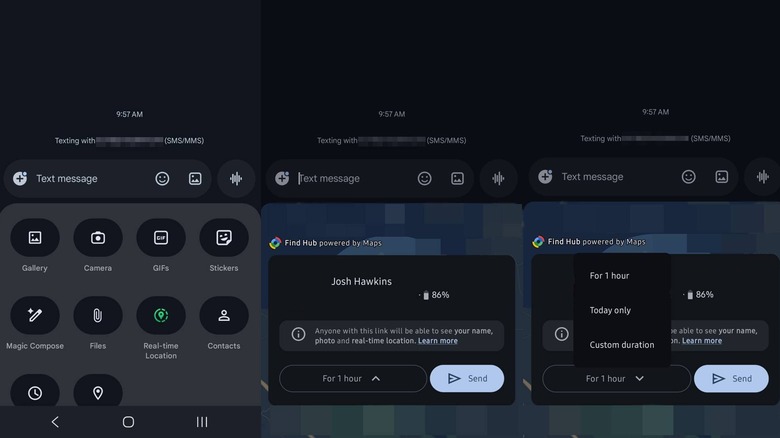
To share your real-time location in Google Messages, open a conversation and tap the plus (+) icon next to the text entry field. Select Real-time location from the menu and grant the necessary location permissions if prompted. Once the map view appears, choose your preferred sharing duration and tap the send button to share your live movement directly within the chat. This feature eliminates the need to jump between apps, allowing you to provide constant updates to friends or family while continuing your conversation.
The Evolution of Mobile Coordination
We have all been there: you are trying to meet a friend at a crowded music festival or a sprawling outdoor mall, and the "Where are you?" texts start flying. Historically, this meant jumping out of your messaging app, opening Google Maps, finding the sharing tool, and then jumping back to paste a link. It was a fragmented experience that felt outdated in an era of seamless multitasking.
As of March 2026, Google Messages reached a milestone of over 1.2 billion monthly active users globally. With an average of more than 14 billion RCS messages sent through the platform daily, the need for integrated tools has never been higher. The introduction of Google Messages real-time location in the March 2026 feature update finally brings professional-grade tracking tools directly into our primary communication hub.
This change represents more than just a convenience. It is a fundamental shift in how we use our mobile devices for travel safety and logistics. By keeping the tracking interface inside the chat, Google is leaning into the Rich Communication Services (RCS) standard, which has seen explosive growth. By May 2025, Google reported that over one billion RCS messages were being sent in the United States every day, following the adoption of the RCS standard by Apple. This cross-platform movement set the stage for the deep integration we see today.
Step-by-Step: Sending Location Without Switching Apps
The beauty of the updated interface is its simplicity. You no longer need to be a power user to handle complex geolocation sharing. The process is designed to be completed in under 30 seconds, ensuring that you can keep moving while you update your contacts.
To get started, follow these steps:
- Open the Google Messages app and select the conversation with the person you want to update.
- Tap the + icon (plus sign) located on the left side of the text input bar.
- Look for the Real-time location option. You may notice a small green dot on the icon, which is the visual indicator for live, active features introduced in the latest Android Feature Drop.
- If this is your first time using the feature, the system will ask for precise location privacy permissions. Ensure you select "While using the app" or "Always" to allow for continuous updates even if your screen is off.
- A small map window will appear. Here, you can see your current blue dot.
- Select your duration from the presets or set a custom time.
- Tap the Send button.
The interface is intuitive, but the real magic happens in the background. The app leverages GPS coordination and the Android Find Hub to ensure that your position is updated with minimal battery drain. This is particularly useful for those of us who travel often and worry about our phones dying while trying to find a hotel or meeting point in a new city.
Duration Presets and Customization Options
One size does not fit all when it comes to sharing your whereabouts. If you are just meeting someone for lunch, you might only need 15 minutes of visibility. If you are on a solo hike or a long road trip, you might want your family to see your progress for the entire day.
Google Messages location sharing duration offers several flexible options to suit these different real-world usage scenarios:
- One Hour: The default "quick meet" setting.
- Until the End of the Day: Perfect for travel safety or multi-stop errands.
- Custom Duration: A slider that allows you to set a specific window ranging from one minute up to 24 hours.
- Until I Turn It Off: An exclusive option for RCS-enabled conversations that provides an indefinite stream until manually revoked.
It is important to understand the difference between Google Messages real-time location vs one-time location static pins. A static pin is just a snapshot of where you were the moment you hit send. If you walk two blocks away, the pin stays behind. The real-time feature, however, follows your movement live on the map. This is essential for ETA tracking when you are stuck in traffic or navigating a busy city on foot.
Editor's Note: While sharing your live position is incredibly useful for finding friends at a crowded stadium, always remember to check who you are sharing with. The "Until I turn it off" setting is best reserved for trusted family members or long-term travel partners.
Cross-Platform Behavior: Sharing with iPhone Users
One of the biggest questions readers ask me is how these features handle the "green bubble" vs "blue bubble" divide. Thankfully, the ecosystem is much more collaborative than it used to be. Because Apple adopted the RCS protocol, many of these features now work natively across platforms.
However, even if the recipient is using an older device or an environment where RCS isn't active, Google has built in a reliable fallback. When sharing live location in Google Messages with iPhone users who might not have the latest software, the app automatically generates a secure Google Maps link.
| Feature | RCS (Android to Android/New iOS) | SMS/MMS (Older Devices) |
|---|---|---|
| Map View | Integrated directly in the chat bubble | Opens in Google Maps app/browser |
| Updates | Live, fluid movement | Link-based tracking |
| Duration Control | Full custom duration support | Fixed duration via link |
| ETA Tracking | Real-time ETA in-chat | Requires manual app switch |
This Google Maps integration ensures that travel safety is never compromised by the type of phone your friends are using. The recipient will see a professional tracking interface that shows your progress, battery level, and estimated time of arrival, even if they are viewing it through a mobile browser.
Safety, Tracking, and How to Stop Sharing
Privacy is a core pillar of the Android experience. When you have an active session, Google Messages provides clear visual cues so you never forget that you are being tracked. A prominent banner appears at the top of the conversation thread, displaying exactly how much time is remaining on your share.
If your plans change or you reach your destination earlier than expected, knowing how to stop sharing live location in Google Messages is vital. You can simply tap the Stop button on the active sharing banner within the chat. Once pressed, the live feed cuts off immediately, and the map bubble in the conversation freezes at your last known location, turning into a static historical pin for reference.
The backend infrastructure—Android Find Hub—is the same technology that helps you locate a lost pair of earbuds or a tablet. This high-level GPS coordination ensures that the data is encrypted and only visible to the participants in the chat. For those concerned about battery usage, the app optimizes data pings based on your speed. If you are stationary, it pings less frequently; if you are moving quickly in a car, it increases the frequency to provide accurate ETA tracking.
FAQ
How do I share my real-time location on Google Messages?
To share your movement, open a chat and tap the + icon next to the text field. Select the option for real-time location, choose how long you want to share for, and hit send. The recipient will then see a live map directly in the conversation.
How long does location sharing last in Google Messages?
You can choose from several presets like one hour or until the end of the day. There is also a custom option that allows you to set any timeframe between one minute and 24 hours. If you are using RCS, you can also select an option to share indefinitely until you manually stop it.
How do I stop sharing my location on Google Messages?
Look for the active sharing banner at the top of the chat thread where you started the session. Tap the stop button on that banner to immediately end the live broadcast. You can also manage all active shares through your Android system's location settings.
Can I share my location with someone using an iPhone via Google Messages?
Yes, you can. If the iPhone user has RCS enabled, they may see the live map directly. If not, Google Messages will send them a secure Google Maps link that opens in their browser or the Maps app, allowing them to track your progress in real-time.
Does Google Messages use Google Maps for location sharing?
Yes, the feature is powered by Google Maps integration and the Android Find Hub. While the map is displayed inside the Messages app for convenience, it uses the same precise GPS coordination and mapping data found in the dedicated Google Maps application.
By mastering these tools, you can stop the endless cycle of app-switching and keep your focus on the journey ahead. Whether you are providing a safety update for a late-night walk or coordinating a complex group meetup, having your movement tracked directly in the chat makes your mobile device feel truly smart. Make sure you have updated to the latest version of the app to take full advantage of these March 2026 features.