Our Top Picks
The Divoom Times Frame is the ultimate luxury for enthusiasts looking to elevate their cyberpunk desk aesthetic with a blend of data-rich widgets and mesmerizing art. It is the best choice for crypto traders and PC builders who prioritize high-end materials and unique visual depth over simple photo scrolling.
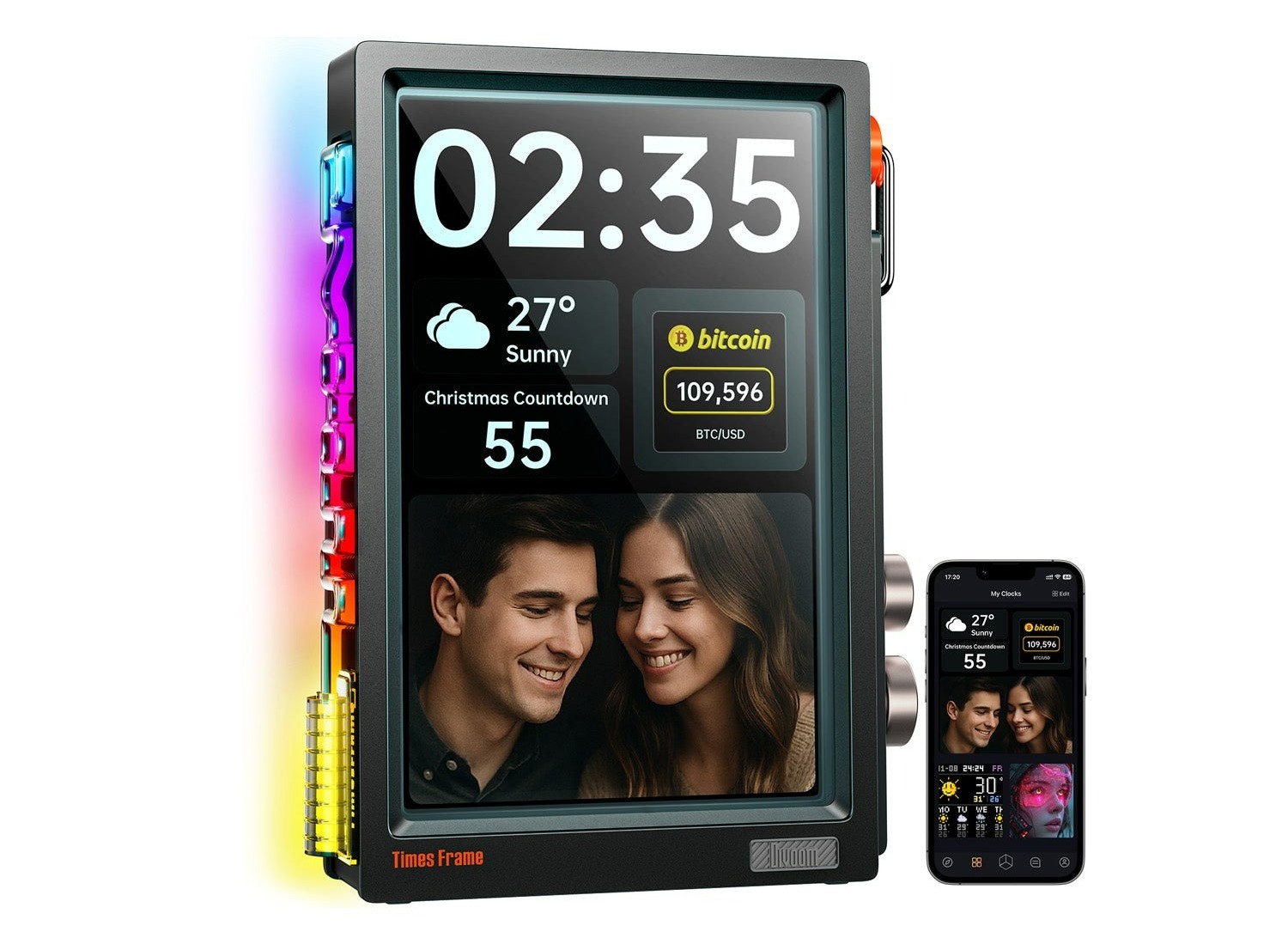
The Divoom Times Frame review highlights a shift in desk aesthetics, moving from flat screens to a 10.1-inch holographic pixel art display that looks like the future. This smart transparent digital frame distinguishes itself from traditional digital frames with a triple-layer tempered glass construction and a transparent 1280x800 IPS panel, creating a floating holographic effect where content appears suspended in mid-air.
Hardware & Design: The Holographic Illusion
As someone who spends most of my day looking at high-refresh-rate monitors and aluminum PC chassis, I usually find digital frames a bit boring. Most are just cheap tablets wrapped in plastic. The Divoom Times Frame changes that narrative immediately. The first thing you notice is the weight and the clarity. Divoom opted for a triple-layer tempered glass construction that gives the device a physical presence most smart displays lack.
The centerpiece is a 10.1-inch transparent IPS display with a resolution of 1280 x 800 that uses its layered glass to create a floating 3D visual effect. This is not a hologram in the Star Wars sense, but rather a clever optical trick. By using a transparent IPS panel, the display can render deep blacks as completely clear, allowing whatever is behind the frame to show through while the pixel art or data widgets seem to hover in the center of the glass. When you look at the Divoom Times Frame transparent IPS screen resolution quality, the density is perfect for pixel art, making the colors pop against the transparent background without visible screen doors.
For the tactile enthusiasts, the Divoom Times Frame mechanical controls and rotary knob functions are a highlight. Instead of a finicky touch screen that gets covered in fingerprints, you get dual mechanical dials on the side. These dials feel like high-quality Hi-Fi equipment. They provide a tactile user interface that allows you to click through different clock faces or adjust the volume of the ambient sound synchronization. It feels intentional and mechanical, perfectly fitting the tech-focused workspace accessory vibe.
Smart Features: More Than Just a Picture Frame
Under the hood, this frame isn't just running a basic slideshow. It is powered by a Linux-based operating system that handles over 50 different applications. For those of us who like to keep an eye on the markets while we work, the crypto and stock ticker display is a killer feature. You can pull real-time API feeds directly to the frame, showing the current price of Bitcoin or your favorite tech stocks without needing to open a browser tab on your main monitor.
If you are a fan of customization, the Divoom app is where you will spend most of your time. This device connects you to a global pixel art community of more than 10 million pixel art creators. You can browse through millions of designs or create your own. The community is incredibly active, offering everything from animated rainy windows to complex cyberpunk cityscapes that look incredible on the transparent screen.
Setting it up is a breeze. When learning how to configure Divoom Times Frame crypto and stock widgets, you simply select the asset in the app, and the frame updates via your home network. It also supports dynamic weather updates, social media counters, and even an ambient sound synchronization mode where the RGB side lighting reacts to the music playing in your room.
Performance, Storage, and Connectivity
In terms of technical performance, Divoom has future-proofed this device by including Wi-Fi 6 technology. This ensures that the real-time data for your widgets remains stable and snappy. During my testing, I found that troubleshooting Divoom Times Frame Wi-Fi connectivity and app pairing was non-existent; it found my network immediately and stayed connected even at the far end of my office.
One of the most impressive specs is the internal capacity. The device is equipped with 64GB of internal storage, which is sufficient to store approximately 700,000 photos or 6,000 minutes of video. When comparing Divoom Times Frame features to traditional digital frames, this is a massive leap forward. Most competitors rely on SD cards or expensive cloud subscriptions to store your media. Here, the storage is built-in and generous, and the content management is entirely cloud-based through the free app.
The performance of the Linux OS is smooth. Scrolling through the 400+ dynamic clock faces feels instantaneous. Whether you are displaying a complex animation or a simple digital clock, the frame handles the transitions without any lag, which is essential for maintaining that premium cyberpunk desk aesthetic.
Divoom Times Frame vs. Traditional Digital Frames
| Feature | Divoom Times Frame | Traditional Digital Frames |
|---|---|---|
| Display Tech | Transparent IPS Panel | Standard LCD/LED |
| Visual Effect | Floating Holographic | Flat 2D Image |
| OS | Linux-based with 50+ Apps | Proprietary Slideshow Software |
| Control Type | Dual Mechanical Dials | Touch Screen or Remote |
| Storage | 64GB Internal | 8GB - 16GB / SD Card |
| Connectivity | Wi-Fi 6 | Wi-Fi 4 or 5 |
| Data Integration | Real-time Crypto/Stocks/Social | Photos Only |
Practical Verdict: Minimalist Desk Setup Impact
The Divoom Times Frame review for minimalist desk setups reveals a device that serves as both a functional tool and a piece of art. It clears the clutter of having multiple small monitors for data while adding a unique visual flair that plastic frames can't match.
However, no piece of hardware is perfect. One quirk I noticed is the USB-C placement. Because it is located on the back and the frame is designed to stand on a desk, there is no native wall mount option. Additionally, you should note that this device requires a 10V power adapter for optimal performance, which is a bit specific compared to standard 5V USB ports. You will want to make sure your power strip can accommodate the included brick.
Despite these minor gripes, the build quality is top-tier. The combination of tempered glass construction and high-resolution digital imagery makes it feel like a professional tool rather than a toy.
Pros
- Stunning holographic pixel art display effect thanks to the transparent panel.
- High-quality tempered glass construction feels incredibly premium.
- Massive 64GB storage for thousands of photos and videos.
- Real-time data widgets for crypto, stocks, and social media stats.
- Tactile mechanical dials offer a much better experience than touch screens.
Cons
- No wall-mounting capability due to the stand design.
- Requires a specific 10V power supply (included, but bulky).
- Premium price point compared to basic digital frames.
FAQ
What can you display on the Divoom Times Frame screens?
The frame supports a wide variety of content including over 10 million community-created pixel art designs, personal photos, and videos. It also features functional widgets for real-time cryptocurrency prices, stock market tickers, weather forecasts, and social media follower counts for platforms like YouTube and X.
How do you customize the Divoom pixel art frame?
Customization is handled through the Divoom mobile app, which connects to the frame via Wi-Fi. Within the app, you can browse a massive library of art, design your own animations, or configure specific widgets and clock faces. You can also use the physical mechanical dials on the device itself to cycle through your saved favorite displays.
Does the Divoom Times Frame show real-time social media stats?
Yes, the frame includes dedicated apps for tracking social media performance. It can display live subscriber or follower counts for various platforms, making it a popular choice for content creators who want to see their growth in real-time on their desk.
Is the Divoom Times Frame screen bright enough for daylight?
The transparent IPS panel is quite bright and maintains good visibility even in well-lit rooms. However, because it is transparent, the background behind the frame can affect visibility. Placing it against a solid, darker surface typically yields the most striking holographic effect during the day.
Does the Divoom Times Frame support custom GIFs?
The device fully supports custom GIFs and animated pixel art. You can upload your own creations through the app, and with 64GB of storage, you have plenty of room to store high-quality animations and short video clips without running out of space.