Our Top Picks
- Aqara G400 PoE Doorbell: The definitive choice for homeowners seeking the stability of a wired Power over Ethernet connection combined with the privacy of HomeKit Secure Video.
- Aqara U400 Smart Lock: A groundbreaking entryway solution that leverages Ultra Wide-Band technology for a truly hands-free proximity unlocking experience that feels like magic.
The Aqara G400 and U400 provide a comprehensive Apple Home security solution, combining 2K HomeKit Secure Video with hands-free UWB unlocking. This setup eliminates subscription fees through local storage and leverages Apple's native ecosystem for seamless control, making this Aqara HomeKit review a must-read for anyone looking to modernize their front door.
The New Entryway Standard: Aqara G400 & U400 Overview
For years, Apple Home users have been navigating a fragmented market, often forced to choose between battery-powered doorbells with laggy connections or smart locks that require a physical tap of a phone to function. Aqara has consistently been one of the few brands to bridge these gaps, currently serving more than 12 million users globally with a massive portfolio of over 280 products compatible with the Apple ecosystem. Their latest duo, the G400 PoE doorbell and the U400 UWB smart lock, represents a significant leap forward in creating a high-performance, subscription-free entryway.
In my years as a smart home editor, I have seen many brands promise a seamless experience, but few deliver on the technical nuances like Aqara. By moving toward Power over Ethernet (PoE) for the doorbell and Ultra Wide-Band (UWB) for the lock, they are addressing the two biggest pain points in home automation: connectivity reliability and friction in user interaction. The G400 ensures you never miss a package due to a dropped Wi-Fi signal, while the U400 ensures you never have to fumble for your keys or even your phone when your hands are full of groceries.
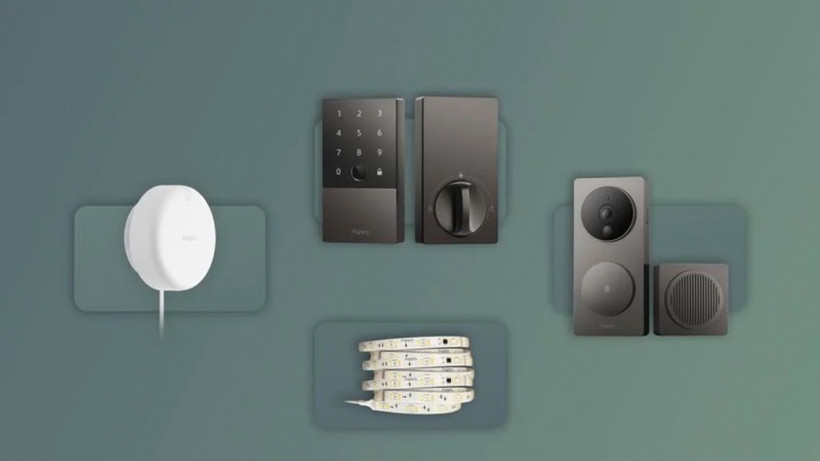
Aqara G400 PoE Doorbell: Vertical Views and HKSV
The Aqara G400 PoE installation guide Apple Home process is surprisingly straightforward for those with existing low-voltage wiring. Unlike its predecessor, the G4, which relied on batteries or standard doorbell wires, the G400 utilizes a single Ethernet cable to provide both power and data. This results in a near-instantaneous live stream when you open the Home app, a rarity in the world of smart doorbells.
3:4 Vertical Aspect Ratio and Package Detection
One of the most practical features I noted during my testing is the Aqara G400 vertical video doorbell field of view. Most doorbells use a traditional 16:9 widescreen format, which is great for cinematic views of your street but terrible for seeing what is actually on your porch. The G400 uses a 3:4 vertical orientation with a 165-degree field of view. This means you can see a visitor from head to toe and, more importantly, check if a package has been left directly under the lens.
HomeKit Secure Video and 2K Resolution
While the hardware boasts a 2K sensor for crisp local recording, it is important to understand the HomeKit Secure Video doorbell setup limitations. Apple currently caps HKSV streams at 1080p. However, the extra resolution from the G400 sensor is not wasted; it allows for better digital zoom and clearer image processing before the video hits the Apple servers.
Key technical benefits of the G400 include:
- Local storage via microSD (up to 512GB) for 24/7 recording.
- Face recognition powered by your iCloud+ library.
- RTSP support for those who want to feed video into a Synology NAS or Home Assistant.
- Zero monthly fees for core features.
The Aqara HomeKit doorbell face recognition setup is handled entirely on your local Apple Home hub (like an Apple TV or HomePod). It scans your Photos library to identify family members and can even announce their names over your smart speakers when they press the button.
Aqara U400 Smart Lock: UWB Proximity vs. NFC Home Key
The standout feature of this lock is the transition from standard NFC to Ultra Wide-Band technology. To understand the value, we need to look at an Aqara U400 UWB vs Home Key comparison. Traditional Apple Home Key locks, like the previous U100, require you to physically tap your iPhone or Apple Watch against the lock reader. It is reliable and secure—even supporting Apple Home Key technology when the mobile device's battery has been depleted—but it still requires an intentional action.
The U400 changes the game with proximity unlocking. Because UWB provides precise spatial awareness, the lock knows exactly how far away you are. As you approach the door with a compatible iPhone 11 or newer (or Apple Watch Series 6 or newer), the deadbolt can automatically retract before you even reach for the handle. This is the definition of hands-free entry.
Hardware and Security Specs
Aqara has built the U400 to be a tank. It is compatible with standard Schlage SC1 5-pin deadbolt cutouts, making it a drop-in replacement for most North American homes.
| Feature | Aqara U100 (NFC) | Aqara U400 (UWB) |
|---|---|---|
| Primary Tech | NFC (Tap-to-unlock) | UWB (Proximity-unlock) |
| Communication | Bluetooth / Zigbee | Matter over Thread |
| Battery Life | Up to 8 months | Up to 12 months |
| Keyway | Schlage SC1 | Schlage SC1 |
| Unlocking Speed | < 1 second (tap) | Seamless (as you approach) |
One of my favorite aspects of Aqara smart lock Apple Home automation is the integration with the Apple Wallet. The digital key sits securely in your Secure Element on your iPhone, utilizing end-to-end encryption. Even if you aren't using the UWB "auto-unlock," the Aqara U400 UWB unlocking with Apple Watch experience is significantly smoother than previous generations.
Professional Tip: When installing the G400, if you notice "ghosting" or IR reflections at night, ensure the doorbell is not mounted too close to a reflective side wall. Also, always update your firmware through the Aqara Home app before bridging the devices to Matter; this ensures the Thread radio is fully optimized for your network.
Installation Guide & Advanced Integration
The Aqara doorbell and lock installation guide starts with hardware, but the real magic happens in the software. For the G400, you will need a PoE injector or a PoE switch. Once plugged in, the Home app will recognize it as a HomeKit Secure Video device instantly.
For the U400, the use of Matter over Thread is a significant upgrade. Unlike Bluetooth, which can be slow and limited in range, Thread creates a self-healing mesh network. This makes the lock much more responsive when triggered by automations.
Connecting to Home Assistant
For the power users out there, connecting Aqara U400 smart lock to Home Assistant via Matter is a breeze. Because Matter is a local-first standard, you don't have to worry about cloud latency. You can pair the lock to both Apple Home and Home Assistant simultaneously using the "Multi-Admin" feature of Matter. This allows you to use the sleek Apple interface for daily use while leveraging Home Assistant for complex, multi-brand automations.
- Install the deadbolt hardware and calibrate the turn-knob in the Aqara app.
- Generate a Matter pairing code in the Aqara app.
- Open Home Assistant and add the device via the Matter integration.
- Ensure you have a Thread Border Router (like an Apple TV 4K or HomePod Mini) to maintain the connection.
FAQ
Does Aqara work well with Apple HomeKit?
Yes, Aqara is widely considered one of the best third-party brands for the Apple Home ecosystem. They offer native support for almost all their devices, and their integration is often deeper than competitors, including support for features like Adaptive Lighting and Home Key.
Do Aqara devices support HomeKit Secure Video?
The Aqara G400 is specifically designed for HomeKit Secure Video. This allows users to store recorded footage in their iCloud account with end-to-end encryption, utilizing Apple's AI for person, pet, and vehicle detection without needing a separate Aqara subscription.
Does Aqara support the Matter standard for HomeKit?
Yes, Aqara has committed heavily to the Matter standard. The U400 smart lock uses Matter over Thread, and many of their older Zigbee devices can be bridged to Matter using an Aqara M3 Hub, ensuring long-term compatibility with all major smart home platforms.
Is an Aqara hub required for HomeKit compatibility?
For the G400 PoE doorbell, no hub is required as it connects directly to your network. For the U400 smart lock, while it can connect via Bluetooth or Thread to an Apple Home Hub, having an Aqara M3 Hub is recommended for advanced features like firmware updates and local automation backups.
Final Verdict: Is the Aqara Upgrade Worth It?
After living with this setup, it is clear that Aqara has mastered the "prosumer" sweet spot. They provide professional-grade hardware like the G400 PoE at a consumer-friendly price point. The shift to UWB in the U400 is the most significant change to smart locks since the introduction of Home Key, finally making the "auto-unlock" feature reliable enough for daily use.
For the millions of users already in the Aqara ecosystem, these products are a natural evolution. If you are starting your smart home journey today, choosing these two devices ensures you have a secure, fast, and subscription-free entryway that will stay relevant for years to come. The combination of local storage, PoE reliability, and hands-free UWB entry makes this the current gold standard for Apple Home users.