Quick Facts
- Top Creative Pick: Photopea (Replaces Adobe Photoshop)
- Best for Video: DaVinci Resolve (Replaces Adobe Premiere Pro)
- Office Standard: LibreOffice 25.x (Replaces Microsoft Office 365)
- Automation Hero: n8n (Replaces Zapier and Make.com)
- 3D Production: Blender (Replaces Autodesk Maya/3ds Max)
- Annual Savings: ~$1,200+ for a standard freelancer or small business stack.
- Core Conclusion: Professional-grade creative work is achievable through browser-based and open-source tools. Photopea provides a robust alternative to Photoshop with layer effects and PSD support, while DaVinci Resolve offers industry-standard video editing and color grading. For 3D animation and modeling, Blender provides a complete suite capable of professional production without licensing costs.
Subscription fees for professional creative suites now exceed $600 annually, leading to massive SaaS subscription fatigue. However, a new wave of underground web tools and open-source powerhouses is making expensive software obsolete for many professionals. By switching to free software alternatives, you can achieve professional-grade results without recurring licensing costs.
Photopea: The Browser-Based Photoshop Rival
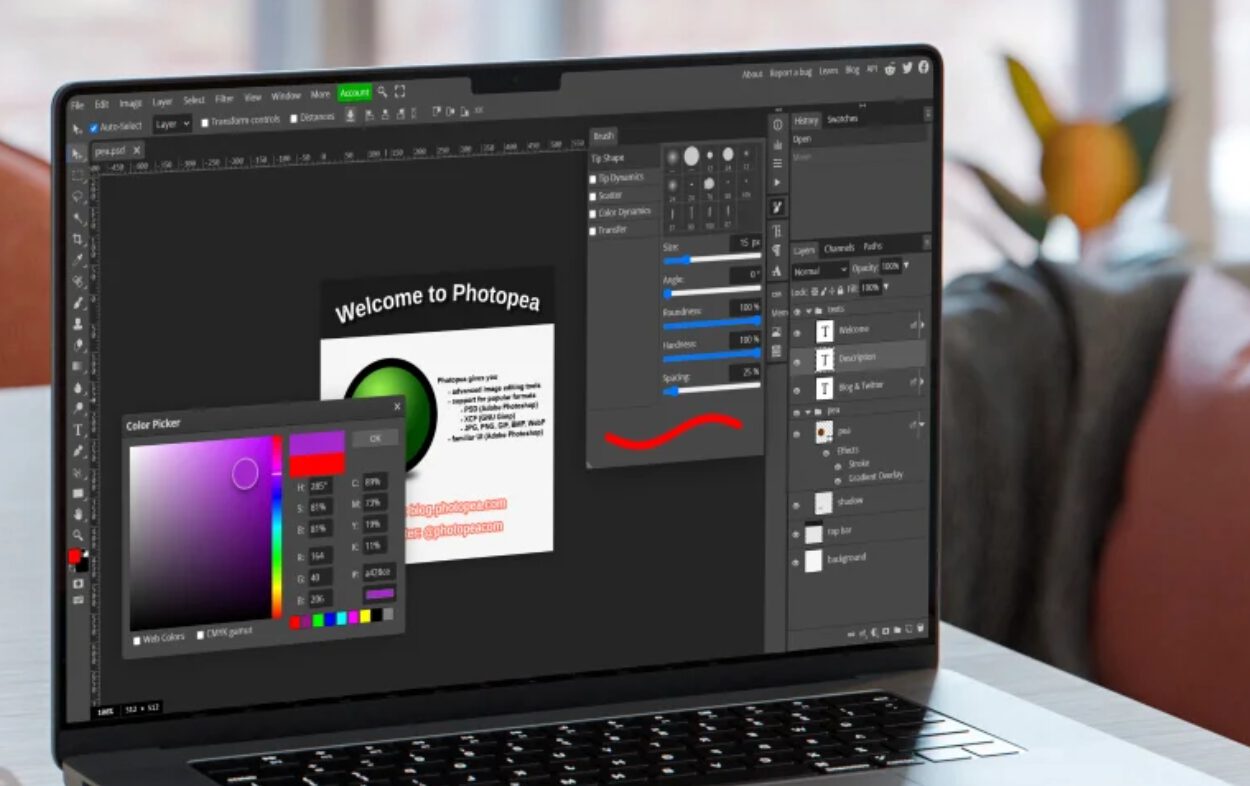
As a PC editor who has seen hardware power explode over the last decade, I am still consistently shocked by what can be achieved inside a browser tab. Photopea is the ultimate example of this evolution. It is not just a simple crop-and-filter tool; it is a full-scale raster graphics editor that mirrors the Photoshop interface so closely that the muscle memory carries over instantly.
For those looking for web-based graphic design alternatives, Photopea handles complex PSD files, layer masks, blending modes, and smart objects without breaking a sweat. It leverages your local hardware through the browser, ensuring that browser-based performance stays snappy even with high-resolution assets. It has become one of the best browser-based graphic design tools for professional use because it removes the barrier of entry for designers who can't justify the $240+ annual Adobe tax.
The market is shifting rapidly. As of late 2024, Canva has surpassed 220 million monthly active users worldwide and holds an estimated 12.47% share of the graphics market, directly challenging Adobe Photoshop's 40.94% dominance. While Canva targets the casual creator, Photopea captures the professional who needs granular control.
Key Technical Advantages
- Direct support for .PSD, .AI, and .XD files.
- Local processing: Your files never leave your machine unless you choose to save them to the cloud.
- No installation required: Runs on any machine with a modern browser, making it a perfect cloud-native editors solution for those working across different hardware.
Caveats The free version is ad-supported. While the ads are non-intrusive and kept to a side panel, those working in high-stakes client environments might find them distracting. Additionally, complex 3D text effects or extremely niche AI generative fill features in Photoshop still hold a slight edge.
DaVinci Resolve & Blender: High-End Production for $0
When we talk about subscription-free professional solutions, the conversation usually starts and ends with DaVinci Resolve. Originally a high-end color grading suite used in Hollywood, Blackmagic Design has transformed it into a world-class NLE (Non-Linear Editor). In 2026, it remains the gold standard for anyone looking for subscription-free software for video editing and color grading.
The free version of DaVinci Resolve is more powerful than the paid versions of most other software. It supports 4K exports, advanced multi-cam editing, and the legendary Fusion effects engine. For the professional editor, this provides creative suite parity with Premiere Pro without the monthly drain on the bank account.
On the 3D side, Blender has moved from a "hobbyist tool" to an industry powerhouse used by Oscar-nominated studios. It offers a complete pipeline for modeling, rigging, animation, simulation, rendering, and compositing. If you are a freelancer looking for how to replace adobe creative cloud with free web apps or open-source software, the combination of Resolve and Blender covers almost everything you would need for high-end media post-production.
Professional Comparison Table
| Category | Industry Standard (Paid) | Free Powerhouse | Estimated Savings (Yearly) |
|---|---|---|---|
| Image Editing | Photoshop ($263) | Photopea / GIMP | $263 |
| Video Editing | Premiere Pro ($263) | DaVinci Resolve | $263 |
| 3D Modeling | Autodesk Maya ($1,875) | Blender | $1,875 |
| Office Suite | Office 365 ($99) | LibreOffice | $99 |
| Automation | Zapier ($240+) | n8n | $240+ |
LibreOffice & n8n: Cost-Effective Productivity Platforms
Productivity software is often the biggest silent drain on a company's budget. For small businesses, licensing costs for "standard" office suites can reach thousands of dollars per year. LibreOffice 25.x has emerged as one of the most reliable open-source alternatives to microsoft office for small businesses, offering a suite that doesn't just "imitate" Word and Excel but provides deep compatibility with .docx and .xlsx formats.
For the modern professional, productivity isn't just about writing documents; it is about workflow automation. This is where n8n comes in. While tools like Zapier charge per task, n8n is a fair-code, self-hosted platform that allows you to build complex workflows without the recurring fees.
As a cost-effective productivity platforms for remote freelancers, n8n allows you to connect your email, CRM, and project management tools using a visual node-based editor. By opting for self-hosting solutions, you maintain control over your data while avoiding the scaling costs that usually come with SaaS automation. It is one of the most powerful underground web tools for streamlining daily productivity because it lets you run thousands of tasks for the price of a small VPS or even for free on your own local server.
Security & Utilities: KeePass and PDF24
Security should never be behind a paywall. As SaaS subscription fatigue grows, many users are moving away from cloud-based password managers that have suffered high-profile breaches. KeePass is a time-tested, local-first alternative. By using local encryption, you ensure that your credentials are never sitting on someone else's server. It is the ultimate resource optimization for security-conscious professionals.
Similarly, PDF management is a notorious "pay-to-play" niche. Adobe Acrobat Pro is expensive, yet most people only need it for OCR (Optical Character Recognition), merging files, or signing documents. PDF24 is a collection of free software alternatives that provide these high-level functions via a web interface or a lightweight desktop app. It handles everything from file conversion to compression without the $15/month subscription fee.
These professional-grade utilities represent the "invisible" layer of your tech stack—the tools you use every day that shouldn't cost a dime but often do because of effective corporate marketing.
The 2026 Migration Framework: When to Switch
Transitioning away from a paid ecosystem requires a strategy. I recommend the 90% rule: if a free tool provides 90% of the functionality you use daily, the remaining 10% can usually be solved with a workaround or a one-time plugin purchase. Professional-grade creative work is about the skill of the operator, not just the price of the license.
To begin your strategic transition, perform a software audit. Most users realize they are paying for features they haven't touched in months. Start by replacing one tool—perhaps switch from Photoshop to Photopea for a week—and monitor your efficiency. You will find that the learning curve is often shallower than the price tag of your current subscription.
Migration Checklist
- Audit Subscriptions: Identify every recurring software fee.
- Format Check: Ensure your free software alternatives can export to formats your clients use (e.g., .docx, .psd, .mp4).
- Hardware Evaluation: Ensure your PC has the RAM and GPU power to handle local-heavy tools like DaVinci Resolve.
- Data Backup: When moving to local tools like KeePass, ensure you have a robust 3-2-1 backup strategy.
- Community Support: Join forums or Discord servers for tools like Blender or n8n to flatten the learning curve.
FAQ
What are the best free software alternatives to popular paid programs?
For creative work, Photopea and GIMP replace Photoshop, while DaVinci Resolve is the best alternative to Premiere Pro. For office productivity, LibreOffice replaces Microsoft Office, and n8n is a powerful alternative to Zapier for automation. Blender is the industry standard for free 3D modeling and animation.
Is free software safe to download and use?
Most reputable free software, especially open-source projects like LibreOffice, Blender, and GIMP, are very safe. They are transparent and frequently audited by the community. Always download from the official project website or trusted repositories like GitHub to avoid modified versions containing malware.
Can free software alternatives replace professional paid tools?
Yes, for the vast majority of users, free alternatives offer creative suite parity. High-end productions for film and television often use Blender and DaVinci Resolve. While some niche features—like specific CMYK color profiles in Photoshop or advanced collaborative features in Office 365—might require a paid tool, the "90% rule" applies to most professional workflows.
Are there any disadvantages to using free software alternatives?
The main disadvantages are usually the learning curve and a lack of official corporate support. While Adobe has a customer service line, open-source tools rely on community forums. Additionally, some free tools may lack the deep cloud integration and real-time collaboration features found in modern SaaS platforms.
Is it legal to use free alternatives for business purposes?
Absolutely. Most free and open-source software is released under licenses like GPL or MIT, which explicitly allow for commercial use. Always check the specific license of the tool, but programs like Blender, DaVinci Resolve (free version), and LibreOffice are widely used in professional business environments legally every day.