Our Top Picks
- The Executive: Spark Mail — Best for managing high-volume communication with Apple Intelligence summarization.
- The Power User: Pocket Informant — The definitive choice for an integrated calendar and task manager apps for iPhone with smart scheduling.
- The Creative: Photomator — Essential for hardware-level visual production and a professional mobile workspace.
- The Minimalist: Things 3 — Focuses on digital minimalism and the GTD methodology without the clutter.
- The High-Performer: Gentler Streak — Uses HealthKit integration to balance professional output with physical recovery.
The best iPhone productivity apps for 2026 workflows are those that move beyond simple list-making to create a unified mobile workspace. By leveraging Apple Intelligence and advanced machine learning, these tools automate routine administrative tasks, allowing professionals to maintain peak cognitive performance through smart scheduling and deep work.
The AI Cognitive Hub: Spark Mail & ChatGPT
The landscape of professional communication has shifted from manual sorting to intelligent filtering. In 2026, you shouldn't be spending hours triaging an inbox; you should be acting on summarized insights. Spark Mail has redefined the mobile inbox by utilizing thread summarization that can condense up to 30 emails into a single, actionable paragraph. This is no longer a luxury; it is a necessity for anyone managing the information density of a modern enterprise.
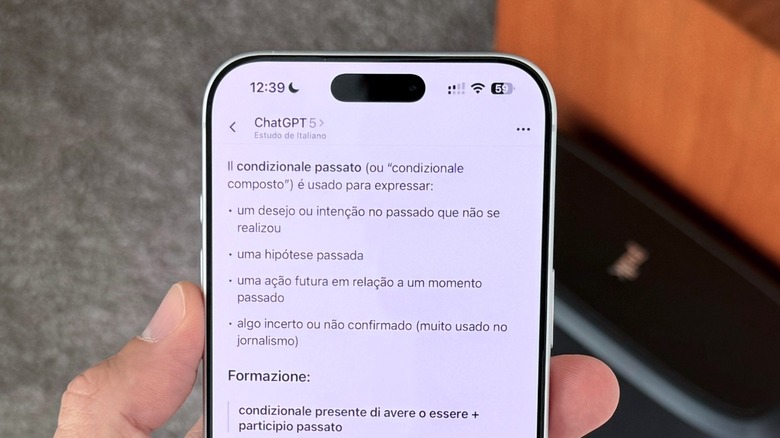
Integrating ChatGPT into your workflow serves as a force multiplier. While many view it as a simple chatbot, its true utility on iOS lies in voice-to-text transcription and vision-based data analysis. You can photograph a complex whiteboard session or a printed spreadsheet, and the AI assistant will extract the data, format it into a table, and sync it to your cloud synchronization provider of choice. This capability was a primary reason why ChatGPT ranked as the top free productivity app on Apple's official 2024 App Store download charts for the United States.
The game changer here is the seamless handoff between these two tools. When you receive a complex brief via Spark, you can instantly port that summary into ChatGPT to generate a project outline or a list of follow-up questions. This removes the friction of "starting from zero" and allows for a more fluid daily efficiency.
Choosing the right iPhone productivity tools for complex workflows means prioritizing apps that communicate with each other. The era of the "app silo" is over. Modern iPhone productivity apps are expected to be proactive, not just reactive, predicting your next move based on your current context.
The Life Command Center: Pocket Informant
For those who find the stock iOS Calendar and Reminders apps too rudimentary, Pocket Informant offers a unified dashboard that bridges the gap between a professional schedule and a personal life. It remains one of the best iPhone productivity apps for busy professionals 2026 because it treats time and tasks as a single entity rather than separate lists.
The app supports the GTD methodology (Getting Things Done) natively, allowing you to assign contexts to tasks—such as "Office," "Home," or "Errands"—and hide what isn't relevant to your current location. This level of digital minimalism is crucial for preventing burnout in a world where work-from-anywhere is the norm. The smart scheduling engine even calculates travel time between appointments based on live traffic data, automatically adjusting your task list to ensure you aren't overbooked.
| Feature | Pocket Informant | Stock iOS Calendar |
|---|---|---|
| Integration | Unified Calendar & Tasks | Separate Apps |
| Methodology | Full GTD Support | None |
| Contextual Alerts | Location-based | Basic Time-based |
| Syncing | Multi-platform Cloud Sync | iCloud Only |
| Customization | Extensive Filters & Icons | Minimal |
One of the standout features in the 2026 update is the inclusion of weather and travel intelligence directly on the unified dashboard. If a storm is forecasted for your commute time, the app suggests moving deep work blocks to an earlier slot. This is the difference between a tool that just records your life and one that helps you manage it.
Recommended For: Professionals managing multiple projects who need a single source of truth for their time.
- Pros: Incredible depth of customization; excellent location-based alerts; robust syncing across devices.
- Cons: Steep learning curve; the interface can feel overwhelming for minimalist users.
Deep Work & Minimalist Execution: Things 3
While some apps thrive on complexity, Things 3 excels through digital minimalism. It is designed for the professional who needs to focus on execution rather than organization. As productivity platforms like Notion have surpassed 100 million users worldwide, there has been a counter-movement toward simpler, faster tools that don't require a master's degree to configure.
Things 3 utilizes Focus filters to align with your iPhone Focus modes. When you trigger "Work" mode, the app automatically hides your personal grocery lists and home renovation tasks, presenting only what is essential for the task at hand. This hardware-level integration is a hallmark of essential iOS productivity tools that respect the user's cognitive load.
The game changer for Things 3 is its interaction design. Using the "Magic Plus" button to drag and drop tasks into specific dates or headings feels more like a physical planner than a digital database. For those practicing time blocking and deep work apps for iOS users, the ability to quickly create a "Today" list that is separate from the "Anytime" backlog is vital for maintaining daily focus.
Choosing Things 3 is a commitment to a specific workflow. It doesn't try to be a CRM or a collaborative whiteboarding tool. It is one of the best minimalist task managers for iPhone efficiency precisely because it stays out of your way. It’s about getting the thought out of your head and into a trusted system as quickly as possible.
Peak Performance Maintenance: Gentler Streak
We have reached a point where we realize that you cannot be productive if you are physically exhausted. In 2026, the definition of iPhone apps for daily efficiency has expanded to include wellness. Gentler Streak represents this shift by using HealthKit integration to tell you when to push and when to rest.
By analyzing biometric data from your Apple Watch—heart rate variability, sleep quality, and activity levels—Gentler Streak provides a "readiness" score. If your recovery is low, the app can automatically trigger Focus filters to limit your work notifications, suggesting that you prioritize rest to avoid a total collapse in cognitive performance later in the week. This is productivity backed by biology.
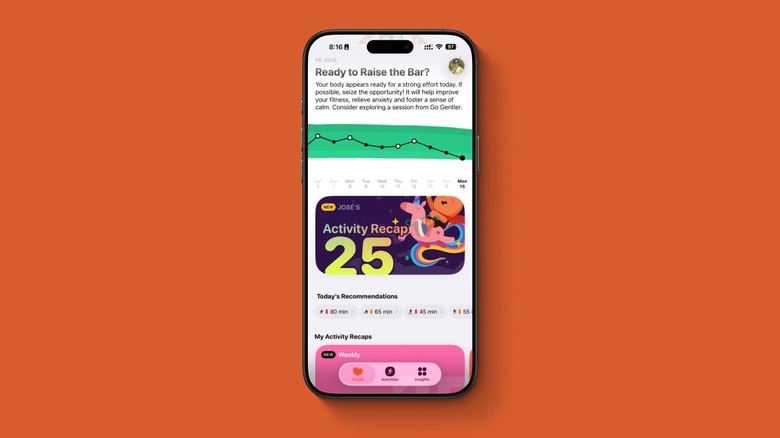
The game changer here is the contextual alerts. Instead of a generic "Time to Stand" notification, Gentler Streak might suggest that your physical state is perfect for a deep work session requiring high concentration. Conversely, it might warn you that your stress levels are climbing, recommending a short break before your next meeting.
Recommended For: High-performers who struggle with burnout and need data-driven permission to recover.
- Pros: Beautifully designed interface; empathetic tone; deep HealthKit integration.
- Cons: Requires an Apple Watch for full utility; subscription-based model.
Professional Creative Workflows: Photomator
With the iPhone 16 and subsequent models, the device has become a legitimate professional camera system. Consequently, Photomator has become an essential tool for creators who need to manage complex visual production on the go. Following Apple’s acquisition of the Pixelmator team, the integration between the software and the hardware has reached an unprecedented level.
Photomator supports over 750 RAW formats and utilizes machine learning for tasks like "Super Resolution" and "Smart Deband." For a mobile professional, this means you can shoot, edit, and publish high-quality visual content without ever opening a laptop. The iPhone 16 Camera Control button allows for streamlined editing, where physical gestures on the phone's frame can adjust exposure or zoom within the app.
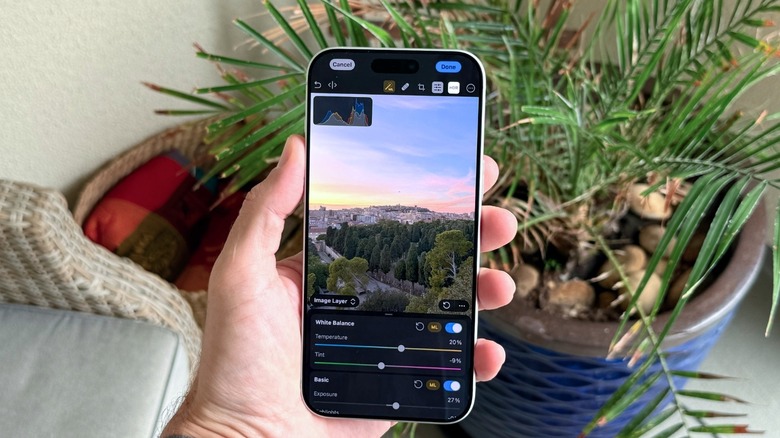
The game changer for Photomator is its non-destructive editing workflow that syncs via iCloud to the Mac and iPad versions. You can start an edit during a commute on your iPhone and finish it at your desk with perfect parity. This represents the pinnacle of the mobile workspace, where the device in your pocket is no longer a compromise but a professional choice.
Whether you are a social media manager, a real estate agent, or a freelance journalist, having professional-grade editing tools on your phone is one of the best apps to streamline daily tasks related to content creation.
FAQ
How can I use my iPhone to be more productive?
To maximize productivity, start by utilizing the built-in Focus modes to filter out distractions. Combine this with specialized iPhone productivity apps that leverage Apple Intelligence to automate administrative work. By setting up a unified dashboard for your calendar and tasks, you reduce the mental friction of switching between different apps, allowing you to stay in a flow state longer.
Which productivity apps are essential for iOS users?
While needs vary, an essential stack usually includes an AI-powered email client like Spark Mail, a robust task manager like Things 3 or Pocket Informant, and a generative AI assistant like ChatGPT for data processing. For those in creative fields, Photomator is essential, while health-conscious professionals should look at Gentler Streak to manage their cognitive load through physical metrics.
What are the top-rated task management apps for iPhone?
Things 3 and Todoist are frequently cited for their ease of use and clean design. For users who require more power and integration, Pocket Informant is highly rated for its ability to combine calendars and tasks. Additionally, the native Apple Reminders app has seen significant updates in 2026, making it a viable free option for basic needs.
Can productivity apps sync across my devices?
Yes, modern iPhone productivity tools rely heavily on cloud synchronization. Most professional-grade apps use iCloud, Google Drive, or their own proprietary servers to ensure that your data is consistent across your iPhone, iPad, Mac, and even the web. This cross-device sync is a standard feature for any app aiming to be part of a professional mobile workspace.
How do I choose the right productivity app for my needs?
Begin by identifying your primary "bottleneck." If you spend too much time on email, prioritize an AI-powered communication tool. If you feel disorganized, look for integrated calendar and task manager apps for iPhone. Always consider the learning curve; a complex tool like Pocket Informant is powerful but requires time to master, whereas a minimalist tool like Things 3 allows you to start being productive immediately.