Quick Facts
- Top Fitness Pick: Nike Run Club (100% free with no hidden subscriptions)
- Best for Commuters: Moovit (Provides real-time public transit alerts and route planning)
- Best Productivity: Todoist (Features excellent custom complications for task management)
- Smartest Utility: Grocery (Includes Siri voice commands and smart list sorting)
- Top Weather Choice: CARROT Weather (Offers hyper-local data with a tiered free model)
- Best for Hydration: WaterMinder (Utilizes activity ring integration to track daily water intake)
- Hardware Optimized: These apps leverage the 64GB storage and enhanced sensors of the Series 11 and Ultra 3.
The best free apple watch apps for utility and health include CARROT Weather for advanced forecasts and Athlytic for AI-driven fitness recovery insights. These third-party applications offer custom complications and real-time data synchronization that expand the functionality of your device beyond the standard pre-installed software. For productivity and daily organization, apps like Todoist and Grocery – Smart Shopping List are top choices, allowing users to manage tasks and sync grocery lists via Siri voice commands or haptic feedback alerts.
Why Your Apple Watch Needs Third-Party Apps
As someone who has tested every iteration of Apple’s wearable since 2015, I’ve seen the hardware evolve from a slow notification hub to the powerhouse that is the Series 11 and Ultra 3. With 64GB storage now standard on high-end models, there is more room than ever for a robust third-party software ecosystem. While Apple’s native apps like Workout, Reminders, and Weather have improved significantly, they are designed to be "one size fits all." This creates a native gap where specialized needs—like advanced marathon training metrics or hyper-local transit notifications—go unmet.
Third-party developers have the freedom to push the wearable user interface further. They focus on niche functionality, such as providing haptic feedback alerts exactly two minutes before your bus arrives or creating a watch-face complication that shows your next three calendar events instead of just one. When you download top third party apple watch apps, you aren't just adding icons to your home screen; you are customizing the sensors and the silicon to fit your specific lifestyle. Whether you are a beginner looking for must-have free apple watch apps for beginners or a power user wanting to optimize every millisecond of your day, the App Store is where the magic really happens.
1. Nike Run Club: The Gold Standard for Fitness
If you are looking for the best apple watch apps for running and heart rate monitoring free of charge, Nike Run Club (NRC) remains the undisputed champion. While many fitness apps have pivoted to aggressive subscription models, NRC remains entirely free. This app is an App Store Editors' Choice for a reason: it offers a professional-grade training experience without a monthly fee. It leverages the precision heart rate sensors and GPS of your watch to provide deep health metrics tracking.
The real strength of NRC lies in its activity ring integration. Every kilometer you run with the app counts toward your Move and Exercise goals, but with much more data than the stock Workout app. You get guided runs from world-class coaches, which are particularly helpful for those using the high-fidelity speakers on the Ultra 3.
Why it beats the stock app:
- Offers "Guided Runs" that provide audio coaching and motivation during the workout.
- Includes a social leaderboard and challenges to keep you motivated with friends.
- Provides a highly customizable wearable user interface that shows pace, distance, and heart rate in high contrast for easy reading while moving.
2. Moovit: Master Your Public Transit
Navigation is one of the most common uses for a wearable, but Apple Maps often falls short when it involves complex subway systems or bus schedules. This is where Moovit excels as one of the top free apple watch apps for public transit navigation. It solves the "last mile" problem by giving you precise, turn-by-turn instructions for trains, buses, and even ferries.
Moovit utilizes smart notification management to keep you updated on service disruptions. On your wrist, it provides real-time data synchronization, meaning if your train is delayed by three minutes, your watch will buzz to tell you before you even reach the platform. The haptic feedback alerts are distinct, so you can tell the difference between "your stop is next" and "there is a delay" without looking at the screen.
Why it beats the stock app:
- Provides a "Live Directions" feature that follows you as you travel, giving "get off" alerts.
- Features a dedicated transit complication that shows the next arrival time for your favorite lines.
- Offers better global coverage for local bus networks than many native mapping solutions.
3. Todoist: Wrist-Based Task Management
For professionals and students, apple watch utility apps free up the need to constantly check a phone for the next appointment or task. Todoist is arguably the best free productivity apps for apple watch complications because of its flexibility. The app allows you to view your "Inbox" or "Today" view directly on your wrist, and adding a new task is as simple as using Siri voice commands.
One of the most impressive features for Series 11 users is how Todoist handles custom complications. You can set a small circular complication to show a count of your remaining tasks for the day, or a larger rectangular one that shows the text of your most urgent upcoming chore. It is a masterclass in daily routine optimization, ensuring you never miss a deadline while your phone remains in your pocket.
Why it beats the stock app:
- The natural language processing allows you to dictate "Pick up dry cleaning at 5 PM" and it automatically sets the reminder.
- It offers cross-platform support, so your tasks sync perfectly whether you use a Mac, PC, or Android tablet.
- The haptic feedback for reminders is subtle but insistent, making it perfect for office environments.
4. Grocery: The Ultimate Shopping Companion
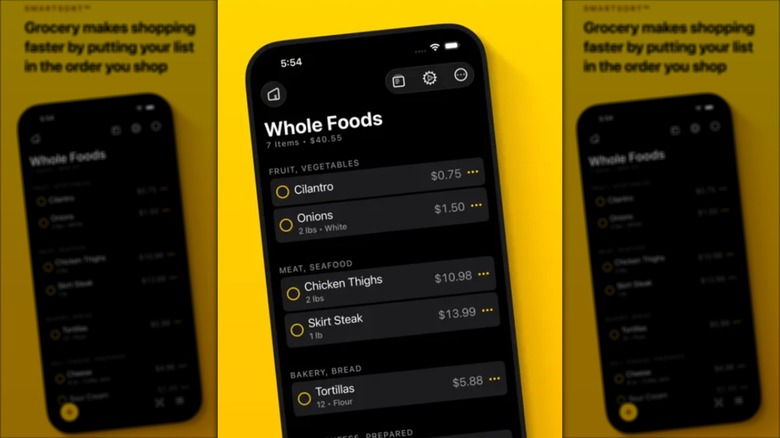
Grocery shopping might seem like a simple task, but doing it with an iPhone in one hand and a shopping cart in the other is a recipe for a cracked screen. Grocery is one of those useful free apple watch apps for grocery shopping lists that feels like it should have been built by Apple. It takes your standard Reminders and transforms them into a smart, sortable list that learns the layout of your local store.
When you use the wearable user interface on Grocery, you can tap items off as you put them in your cart. If you always buy milk first and eggs last, the app will eventually sort your list in that order automatically. It is a brilliant example of how watchOS compatibility can make a mundane task significantly more efficient.
Why it beats the stock app:
- Automatically sorts items by aisle based on your shopping history.
- Allows for shared lists so your spouse can add items to the list while you are already at the store.
- The "Quick Add" feature via the watch face makes it easy to remember items the moment you run out of them at home.
5. CARROT Weather: Snarky & Precise Forecasts
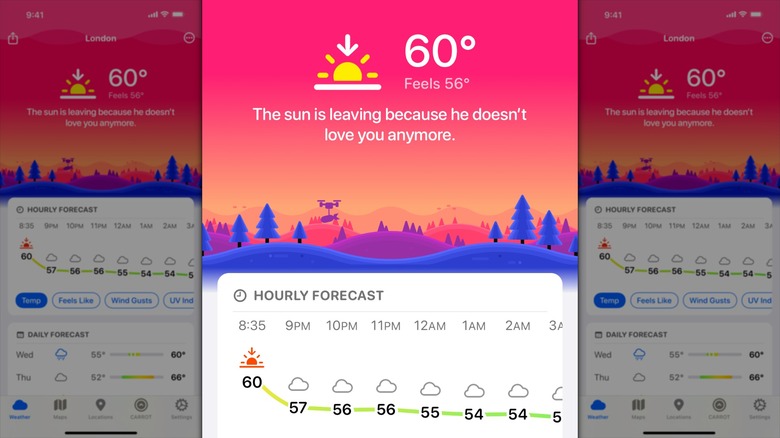
Weather apps are a dime a dozen, but CARROT Weather stands out because of its personality and its data-heavy custom complications. While there are in-app purchases for premium data sources like AccuWeather or Foreca, the free tier is incredibly generous for the casual user. It provides real-time data synchronization for rain alerts and temperature changes, delivered with a "personality" that ranges from friendly to homicidal.
What makes this one of the must have free apple watch apps is its unparalleled customization. You can build a watch face that shows the wind speed, UV index, and "feels like" temperature all in one view. For users of the Ultra 3, the large screen real estate allows CARROT to display a mini-radar map that is surprisingly readable for such a small device.
Why it beats the stock app:
- The hyper-local precipitation alerts are often more accurate than the standard Apple Weather notifications.
- The "Secret Locations" game makes checking the weather a fun, interactive experience.
- It offers a wider variety of complication styles, allowing you to fit weather data into almost any watch face layout.
Finding the Best Third Party Apps
When searching for must-have free apple watch apps for beginners, always look for the App Store Editors' Choice badge. This indicates that the app has been vetted for both performance and design. Also, pay attention to the update frequency; the best apps are updated regularly to support the latest watchOS compatibility features.
Don't be afraid to experiment with your watch face. The most powerful way to use these apps is through complications. A well-configured watch face with Nike Run Club, Todoist, and CARROT Weather can save you dozens of phone pickups a day, truly turning your Apple Watch into the ultimate personal assistant.
FAQ
What are the best free apps for Apple Watch?
The best free apps currently include Nike Run Club for fitness tracking, Moovit for public transit, Todoist for task management, Grocery for shopping lists, and CARROT Weather for forecasts. These apps provide specialized features that the pre-installed Apple software often lacks, such as smart aisle sorting and coached running workouts.
Can I use an Apple Watch without paying for subscriptions?
Yes, you can absolutely use an Apple Watch without paying for monthly subscriptions. While many apps offer "Pro" or "Premium" tiers, the five apps mentioned in this guide all offer robust free versions. For example, Nike Run Club is 100% free with no hidden costs, and Grocery provides all its essential features without a subscription.
Are there any totally free sleep trackers for Apple Watch?
While Apple has a built-in sleep tracker that is free, users looking for more depth often turn to Sleep Cycle or Pillow. Both have free tiers that offer basic sleep stage analysis. However, for the most comprehensive data without any cost, the native Apple Sleep app is actually one of the most accurate options on the market.
What are the must-have free apps for a new Apple Watch?
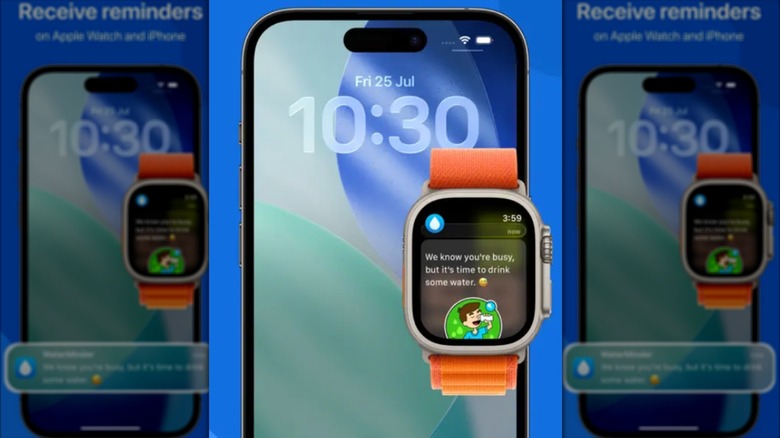
For a new owner, the must-have free apple watch apps include a good transit app like Moovit, a habit or health tracker like WaterMinder, and a productivity tool like Todoist. These apps help you realize the potential of the device beyond just receiving text messages and tracking your steps.
How do I find high-quality free apps on the Watch App Store?
To find the highest quality apps, open the App Store on your iPhone, go to the "Apps" tab, and scroll down to the "Top Free Apps" chart. Look for apps with high ratings (4.5 stars or higher) and those that mention watchOS compatibility in their descriptions. Checking the "Editors' Choice" section is also a reliable way to find well-designed software.