Quick Facts
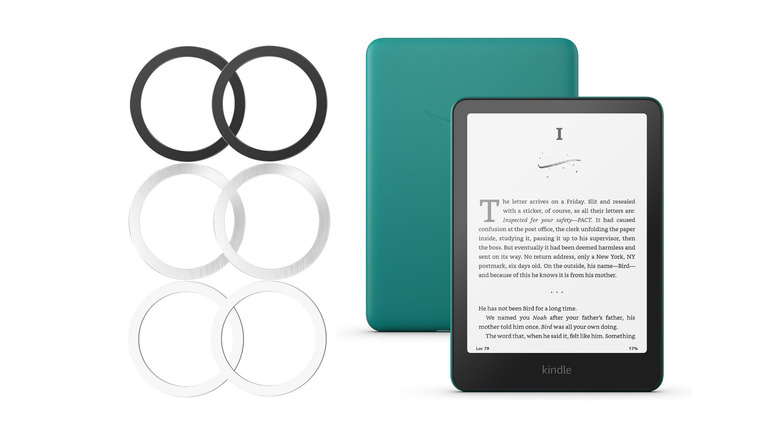
- Price: $6 for a 6-piece value pack.
- Thickness: 0.4mm ultra-thin profile for minimal bulk.
- Compatibility: Universal fit for all Kindle models, including Paperwhite and Signature Edition.
- Material: Metal rings with 3M adhesive backing (single-use).
- Included Colors: 3 black and 3 silver rings in the standard set.
- Primary Use: Enabling MagSafe compatible Kindle accessories like PopSockets and magnetic stands.
To add MagSafe support to an Amazon Kindle, you can apply a universal magnetic metal ring, like the Kalapop set, to the back of the device or its case using the provided adhesive backing. This modification allows the e-reader to connect with magnetic accessories such as PopSockets, mounts, and stands. Since the adhesive is generally single-use, it is important to test the placement before final application.
For Kindle models featuring wireless charging, such as the Paperwhite Signature Edition or Colorsoft, the Kindle MagSafe ring must be precisely centered over the internal Qi charging coils to function correctly. A helpful tip for alignment is to move a MagSafe charger along the back of the device until it naturally grips the internal magnets, marking that spot as the center point for the permanent metal ring installation.
Why the Kalapop Metal Ring is the Best Kindle MagSafe Ring
If you have ever spent a three-hour reading session trying to balance a Kindle Paperwhite 11th Gen on your pinky finger, you know that e-reader ergonomics are far from perfect. While Amazon has perfected the E-ink display, the flat, slippery back of the device can be a literal pain in the wrist. This is where a Kindle MagSafe ring comes into play. After testing several options, the Kalapop Metal Ring stands out as the most practical and cost-effective solution for anyone wondering how to add MagSafe to Kindle devices without adding unnecessary weight.
The most compelling reason to choose this specific kit is the value proposition. For roughly $6, you receive a 6-piece set that includes three black and three silver rings. This is particularly useful because the adhesive used on these rings is high-strength 3M tape, which is designed for a single application. Having five spares means you can move the ring to a new case or a new device in the future without having to buy a whole new kit.
In my testing, the standout feature was the physical profile. Most magnetic adapters are thick enough to snag on the edge of a sleeve or make the device wobble when placed on a table. The Kalapop ring features an ultra-thin design with a thickness of only 0.4 millimeters. This 0.4mm thickness is thin enough that you barely feel the transition from the case to the ring, yet it provides enough magnetic surface area to securely hold a heavy-duty MagSafe PopGrip or a magnetic wallet.
The product is explicitly marketed for its universal compatibility with various mobile devices, which makes it an ideal candidate for the niche world of Kindle modding. Unlike rings designed specifically for the iPhone 15 or 16, which often have a "tail" or notch for orientation, these are simple, clean circles. This simplicity is exactly what you want when trying to maintain the minimalist aesthetic of an e-reader.
Installation Pro-Tips: How to Add MagSafe to Kindle Paperwhite
Installing a Kalapop metal ring is straightforward, but doing it correctly is the difference between a secure grip and a ring that peels off after a week. If you are applying the ring directly to your device, I recommend reconsidering and using a slim TPU or hard-shell case instead. Removing adhesive MagSafe rings from Kindle surfaces can be tricky, and the residue might mar the soft-touch finish of the Paperwhite.
Before you peel the 3M backing, you must prep the surface. Use a small amount of isopropyl alcohol to wipe down the back of your case. This removes oils from your hands that can prevent the adhesive from bonding. Once dry, you need to decide on your placement. If you don't care about wireless charging, you can place the ring wherever it feels most comfortable for your hand. However, if you have a Signature Edition, alignment is everything.
Editor's Tip: The Alignment Hack If your Kindle supports wireless charging, do not guess where the center is. Plug in a MagSafe-compatible charger and slowly slide it around the back of the Kindle. When you feel a magnetic "tug," you have found the internal Qi wireless charging coil. Use a pencil or a piece of tape to mark the edges of this spot. This ensures your MagSafe ring alignment for Kindle wireless charging is perfect, allowing power to pass through the center of the ring to the internal battery.
Follow these steps for a perfect Kalapop metal ring installation:
- Dry Fit First: Place your magnetic accessory (like a PopSocket) onto the metal ring and hold it against the Kindle to see how it feels in your hand.
- Mark the Spot: Once you find the ergonomic "sweet spot," mark the outer edges with a washable marker.
- Peel and Press: Remove the adhesive backing and press the ring firmly onto the case for at least 30 seconds.
- Wait for the Bond: Do not attach a magnetic accessory immediately. Give the 3M adhesive at least 24 hours to fully cure for maximum durability.
Ergonomic Benefits: Reading Comfort and One-Handed Use
The primary reason to invest in a Kindle MagSafe ring is the massive boost to reading comfort. When you add a MagSafe-compatible PopGrip to the back of your device, you transition from "holding" the Kindle to "wearing" it. You can slide two fingers around the grip, allowing the device to rest securely in your palm without any gripping force required. This significantly reduces wrist strain during those long, late-night reading sessions.
One-handed reading becomes truly effortless. Whether you are standing on a crowded train or lying on your side in bed, the added stability prevents the dreaded "Kindle-to-the-face" drop. Furthermore, the MagSafe system is modular. When you are done reading and want to slip the Kindle into a bag, you simply pop the grip off. The 0.4mm ring stays behind, keeping the device slim enough for any sleeve.
For those who prefer hands-free reading, the ring opens up a world of MagSafe mounts and stands for Kindle readers. You can use a magnetic gooseneck tablet holder attached to your headboard or a bedside table. Instead of fumbling with plastic clamps that might crack your screen protector or block the charging port, you simply click the Kindle onto the magnetic head. It is a game-changer for accessibility and pure relaxation.
Ring on Case vs. Ring on Device
| Feature | Ring on Protective Case | Ring Directly on Kindle |
|---|---|---|
| Safety | Maximum protection for the Kindle | Risk of adhesive residue on device |
| Adhesion | Excellent on smooth TPU/Hard plastic | Good, but permanent bond to finish |
| Wireless Charging | Works if the case is thin (<2mm) | Most efficient power transfer |
| Portability | Adds slight bulk of the case | Maintains original thin profile |
| Removability | Easy to swap by changing cases | Harder to remove without tools |
Potential Drawbacks and Compatibility Warnings
While the Kalapop solution is the best Kindle MagSafe ring for the money, it is not without a few technical quirks. The most notable issue involves the official Anker wireless charging dock designed for the Kindle Paperwhite Signature Edition. In some instances, the presence of a metal ring can cause the dock to detect an "interference" error, often signaled by a flashing light on the dock's LED. If you rely on that specific dock, you may need to experiment with the ring's vertical placement to ensure it doesn't block the specific sensors the dock uses to verify the device.
Another consideration is the type of case you use. The 3M adhesive on the Kalapop rings bonds exceptionally well to hard plastic and standard TPU. However, it struggles with "liquid silicone" cases or cases with a heavily textured or fabric back. If your case has a soft, velvety feel, the ring may peel off when you try to remove a strong magnetic accessory.
Finally, remember that these are metal rings, not magnets themselves. They provide a surface for MagSafe compatible Kindle accessories to grab onto. This means they won't stick to a refrigerator or a non-magnetic metal surface on their own; they require an active magnet on the accessory side to create a bond.
FAQ
How do I attach a MagSafe ring to my Kindle?
To attach the ring, first clean the back of your Kindle case with alcohol. Determine the center point of the device (or the wireless charging coil), peel the adhesive backing from the Kalapop ring, and press it firmly into place. It is best to let the adhesive set for 24 hours before attaching heavy accessories.
Can I use MagSafe accessories on a Kindle?
Yes, once a metal ring is applied to the Kindle or its case, you can use any standard MagSafe accessory. This includes magnetic PopSockets, wallets, charging cables, and various MagSafe mounts and stands for Kindle readers.
Will a MagSafe ring damage a Kindle's internal battery?
No, a metal ring is passive and does not generate a magnetic field. Even when a magnetic accessory is attached, the magnets used in MagSafe systems are not strong enough to interfere with the internal battery or the E-ink display of a modern Kindle.
Where should I place a MagSafe ring on a Kindle for the best grip?
For the best ergonomics, most users prefer the ring to be centered horizontally but slightly below the vertical midpoint. However, if you want to maintain wireless charging, the ring must be centered precisely over the internal charging coil.
Does a MagSafe ring work with a Kindle Paperwhite?
Yes, the Kalapop ring is universally compatible and works perfectly with the Kindle Paperwhite, including the 11th Gen and the Signature Edition. It is one of the most popular ways to improve e-reader ergonomics.
Can I use a MagSafe charger to charge my Kindle?
If you have a Kindle Paperwhite Signature Edition or the new Colorsoft, you can use a MagSafe charger to charge the device wirelessly through the ring. However, standard Kindle models without Qi wireless charging hardware will not be able to charge this way, though the charger will still magnetically stick to the ring.