Quick Facts
- Core Engine: Powered by the Gemini Multimodal AI (specifically the Nano Banana 2 model) for on-device and cloud processing.
- Search Innovation: Feature-rich Ask Photos conversational reasoning replaces traditional keyword searches.
- Transcription Tool: High-accuracy handwriting to text capabilities using contextual multimodal AI.
- Editing Access: Magic Editor is now available for all users with 10 free saves per month for non-subscribers.
- Privacy Controls: Your photo library remains private, though specific Ask Photos queries may be used to improve machine learning algorithms.
- System Requirements: Requires a minimum of 3GB RAM and Android 8.0 or iOS 15 to run basic Google Photos AI features.
Use Google Photos AI features to transform your mobile photography workflow. Google Photos AI features now include Ask Photos, a Gemini-powered conversational tool that handles handwriting to text, complex library queries, and personalized image generation via the Nano Banana model, making it the most powerful personal AI tool available in 2026.
We have all been there. You are scrolling through thousands of images trying to find a specific receipt from three years ago or a photo of the "blue door" you saw in a car-free village during vacation. In the past, Google Photos relied on simple tags and computer vision. Today, it has evolved into a sophisticated digital memory archiving system that understands the context of your life.
Ask Photos: Beyond Simple Search to Personal Reasoning
The introduction of Ask Photos marks a significant shift in how we interact with our digital history. Unlike the old search bar, this Gemini-powered interface acts as a smart search engine that can reason. If you ask, "What was the name of the hotel with the infinity pool in Bali?" the app doesn't just look for pools; it cross-references location data, calendar entries, and visual cues within your photos to give you a definitive answer.
To get started, you must first learn how to opt-in to Gemini features in Google Photos. Open your app settings, navigate to the Google Labs or AI features section, and toggle on Ask Photos. Once enabled, you can start using Ask Photos Gemini search tips for personal images to simplify your life. For instance, you can ask the AI to "Find my license plate number" or "Summarize the notes from my last meeting."
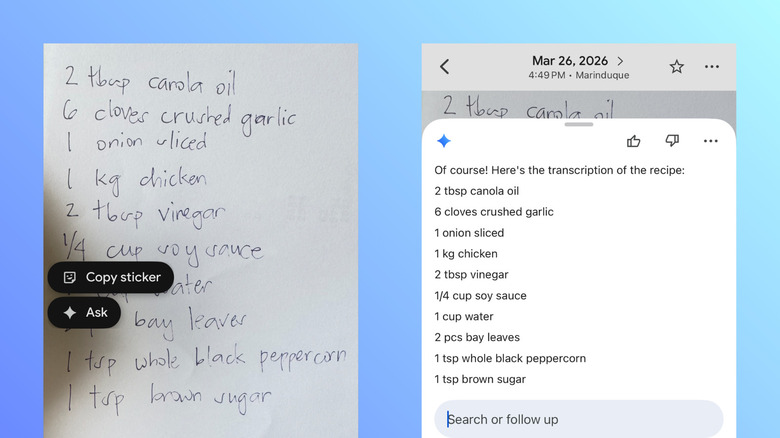
One of the most impressive additions is the advanced handwriting to text Google Photos integration. This isn't just basic optical character recognition. Because the app uses Multimodal AI, it can decipher messy scribbles by understanding the context of the surrounding images. If you have a photo of a whiteboard from a brainstorm session, you can use a specific prompt to convert those scribbles into a structured digital list.
When learning how to use Ask Photos for handwriting transcription, simply pull up the image of your notes and trigger the conversational interface. You might say, "Transcribe the grocery list from this photo and format it into a checklist." The system will analyze the ink strokes, compare them against known patterns using machine learning algorithms, and provide a clean text output that you can copy into your notes app.
Pro-Tip: The Remember List You can ask Gemini to "remember" specific things from your photos. For example, "Remember that Sarah likes her coffee with oat milk." Later, if you are planning a brunch, you can ask Ask Photos for dietary preferences it has found in your library, creating a personalized knowledge graph.
The 2026 Google Photos Editing Tools Guide
The current Google Photos editing tools guide is no longer just about adjusting brightness and contrast. With the expansion of generative image editing, the app has become a creative powerhouse. In mid-2024, Google expanded access to its generative AI Magic Editor to all users, and by 2026, these tools have become the industry standard for mobile photography workflow.
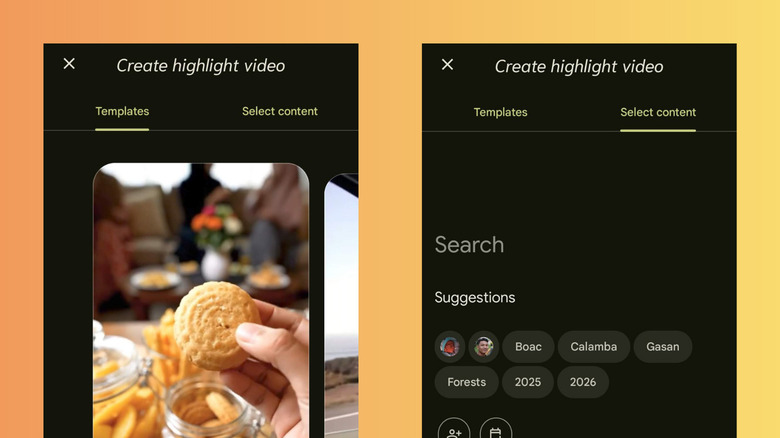
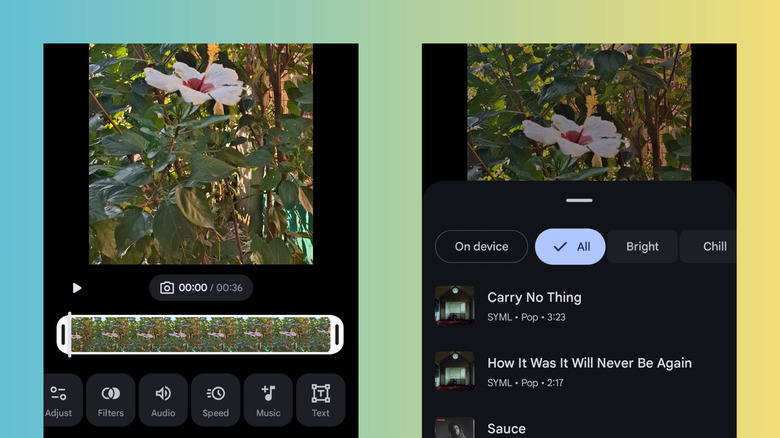
The 2026 update emphasizes automated curation. The app can now identify the "best" shots from a weekend trip and automatically generate a highlight reel. When we look at Google Photos AI video editing vs CapCut, Google’s strength lies in its deep integration with your library. While CapCut offers more manual filters, Google Photos uses AI to sync your video clips perfectly with the beat of the music you choose, often requiring zero manual effort from the user.
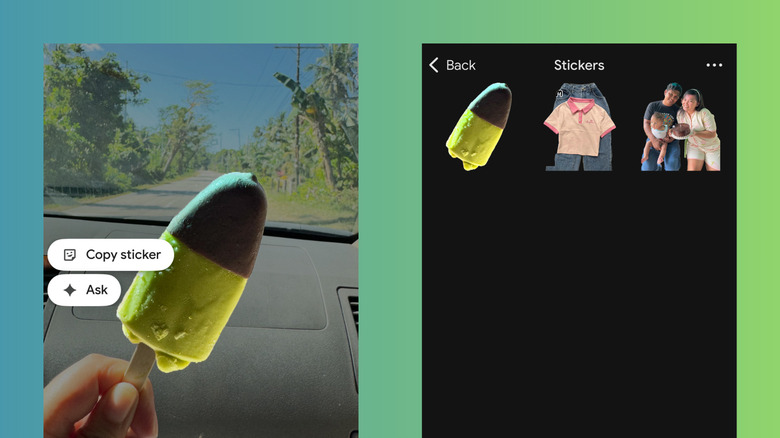
A standout feature in this year's suite is Subject extraction. This allows you to long-press on a person, pet, or object in any photo to lift it from the background. This is the primary method for creating custom stickers in Google Photos Android. Once extracted, you can save these subjects as PNGs with transparent backgrounds or turn them into animated stickers for use in messaging apps.
For more complex edits, we recommend a layering technique. Start with Magic Editor to reposition your subject or change the sky, then apply Magic Eraser to remove distracting background elements.
| Feature | Best For | Complexity |
|---|---|---|
| Magic Eraser | Removing photobombers and power lines | One-tap / Simple |
| Magic Editor | Moving subjects, changing lighting, generative fills | Multi-step / Advanced |
| Subject Extraction | Creating stickers and social media assets | Long-press / Medium |
| Automated Highlights | Quick social media video production | AI-driven / Simple |
As of May 2025, Google Photos reached approximately 1.5 billion monthly active users, and much of that growth is attributed to these pro-level tools being accessible to everyone. Even the video suite now includes sophisticated audio tools that help reduce background wind noise or enhance speech, making your home movies feel like professional productions.
Personalized Creation: Generative AI with Your Own Photos
The most futuristic aspect of the 2026 update is personalized AI image generation using Google Photos library. By utilizing the Nano Banana model, the app can now use the likeness of you and your loved ones to guide generative tasks. This means you can prompt the AI to "Show me and my dog on a space station in a watercolor style," and it will generate a brand-new image using your actual faces.
This is not just a gimmick. It is a fundamental shift in how we view digital memories. The integration with Gemini allows for stylized prompting where you can choose themes like claymation, 3D render, or classic oil painting. To maintain transparency, Google includes a Sources button on all generated images. Clicking this will show you exactly which photos from your library were used as a reference for the AI.
We’ve found this particularly useful for creating personalized birthday cards or social media posts that feel unique and creative without requiring professional design skills.
Privacy and Prerequisites: What You Need to Know
With such powerful machine learning algorithms analyzing your life, understanding your data privacy settings is essential. Google differentiates between your private library data and the data used for Gemini training. While your photos are never used to train public models without your explicit permission, the text queries you type into Ask Photos may be reviewed by human annotators to improve the system.
Before you dive in, ensure your device meets these requirements:
- At least 3GB of RAM (Most mid-range phones from the last three years meet this).
- Android 8.0 or iOS 15 or higher.
- Face Groups must be enabled in your settings for the AI to recognize people.
- The user must be over 18 to access generative AI features.
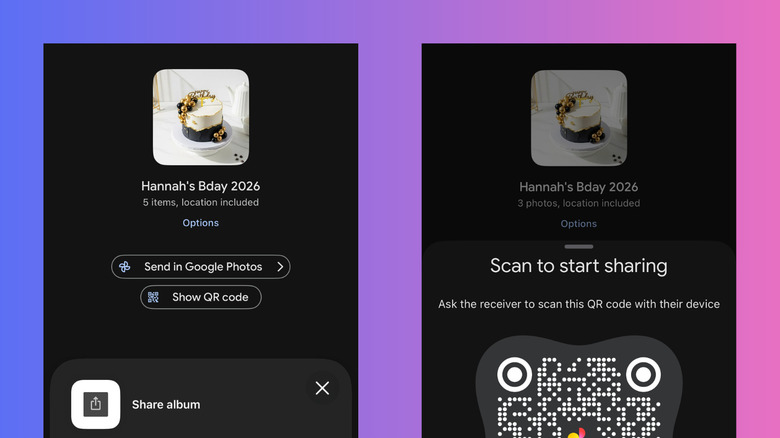
Sharing has also been overhauled. You can now generate a unique QR code for any album, making it easy to share photos at a party or wedding without having to swap contact info with every guest. This integration of ease-of-use with high-end tech is exactly why Google Photos remains the dominant player in the space.
FAQ
What are the new AI editing features in Google Photos?
The latest update includes Magic Editor for subject manipulation, Magic Eraser for object removal, and subject extraction for creating stickers. It also features generative video tools that automate the creation of highlight reels with music and audio enhancements.
How do I use Magic Editor in Google Photos?
To use Magic Editor, open a photo and tap the edit button, then look for the colorful Magic Editor icon in the bottom left corner. You can then tap, circle, or brush over subjects to move, resize, or delete them. You can also tap the sky or water to change their appearance using generative AI.
How does Google Photos AI search work?
The search functionality has evolved into Ask Photos, which uses Gemini Multimodal AI. Instead of just searching for keywords like dog, you can ask complex questions such as "Where did we go camping last summer?" The AI analyzes visual content, location data, and context to provide a conversational answer.
Does Google Photos use my private images to train AI?
Your photos and videos are private and are not used to train Google’s AI models for public use. However, if you use Ask Photos, the text of your queries may be used to improve the service, though these are typically disconnected from your user account during the review process.
Is Magic Eraser free for all Google Photos users?
Yes, as of 2024, Magic Eraser and other basic AI tools are free for all users on Android and iOS. However, users without a 2TB Google One subscription or a Pixel device are limited to 10 saves per month when using the more advanced Magic Editor.