Quick Facts
- Top Overall: Chrome Remote Desktop for its unmatched ease of use across Windows, Mac, and Linux.
- Best for Productivity: Splashtop, specifically optimized for Samsung DeX integration and professional workflows.
- Best for Gaming: DeskIn, offering high frame rate optimization and 4K/60FPS support for low latency play.
- Best for Windows Integration: Microsoft Remote Desktop, utilizing the native Microsoft Remote Desktop Protocol for Pro users.
- Best Local Control: Unified Remote for turning your phone into a local network mouse and keyboard.
- Open Source Pick: RustDesk, providing a secure, self-hosted alternative for those prioritizing privacy.
The best Android remote desktop apps for 2025 include Chrome Remote Desktop for seamless cross-platform use, Unified Remote for local peripheral control, and Microsoft Remote Desktop for Windows integration. For professional environments, tools like Splashtop, Zoho Assist, and TeamViewer provide advanced features such as unattended access and multi-monitor support, while RustDesk offers an open-source alternative for privacy-conscious users.
As a mobile editor, I’ve spent the last decade watching our smartphones evolve from simple communication tools into the primary hub of our digital lives. In 2025, the boundary between your mobile device and your workstation has all but vanished. Whether you are a creative professional needing to check a render on the train, or a student trying to access a file left on a home PC, the right remote access tools are essential. We rank the best Android remote desktop apps for speed, security, and gaming performance to ensure you stay productive regardless of your physical location.
The market for these tools is expanding rapidly. The global remote desktop software market is projected to reach an estimated value of 4.05 billion USD in 2025, driven by the increasing adoption of cloud computing and hybrid work models. In 2025, North America is expected to maintain its dominance in the remote desktop software industry, capturing approximately 31.30% of the total global revenue share. This growth means more options for users, but also more complexity in choosing the right one.
| App Name | Best For | Protocol | Max FPS | Starting Cost |
|---|---|---|---|---|
| Chrome Remote Desktop | General Users | Proprietary (WebRTC) | 30-60 FPS | Free |
| Microsoft Remote Desktop | Windows Pro Users | RDP | 60 FPS | Free |
| Splashtop | Business/DeX | Proprietary | 60 FPS | Subscription |
| DeskIn | Remote Gaming | Proprietary | 144 FPS | Free/Premium |
| Unified Remote | Local Media/Mouse | Bluetooth/Wi-Fi | N/A | Free/One-time |
| RustDesk | Privacy/IT | Self-hosted/P2P | 60 FPS | Free/Open Source |
Compatibility Check: Windows Home vs. Pro
Before you dive into the Google Play Store, there is a critical technical hurdle you need to understand. Many users assume they can just use the native Microsoft tool to control windows 11 from android phone over wifi, only to find it doesn’t work. This is because the Microsoft Remote Desktop Protocol is a feature reserved for Windows 10/11 Pro, Enterprise, or Education editions.
If your laptop came with Windows Home edition, the native RDP host is disabled. You can still use your Android device as a client, but your PC won't be able to "listen" for that connection. For Home edition users, third-party alternatives are mandatory. These apps often use their own proprietary streaming protocols or a VNC server to bypass the limitations of the Windows license.
Additionally, if you are using a tool that utilizes RDP, you must ensure that Network Level Authentication (NLA) is enabled on your PC. This adds a layer of security by requiring users to authenticate before a full session is established, protecting your machine from brute-force attempts.
Pro-Tip: Not sure which Windows version you have? Go to Settings > System > About. If it says "Windows 11 Home," skip Microsoft's native app and head straight for Chrome Remote Desktop or Splashtop.
The Best Android Remote Desktop Apps for Every Need
Selecting the right app depends heavily on whether you are looking for a full desktop mirror or just a way to skip a song on Spotify from across the room.
Chrome Remote Desktop: The Easiest All-Rounder
For the vast majority of people, Chrome Remote Desktop is the best free remote desktop apps for android 2025 has to offer. It is platform-agnostic, meaning it works just as well on a Mac as it does on a PC. The setup is remarkably simple and doesn't require fiddling with port forwarding or complex IP addresses.
To get started with a remote desktop for Android setup guide, first install the Chrome Remote Desktop extension on your host computer's browser. Once you've enabled remote access and set a PIN, download the companion app on your phone. Because it ties directly to your Google account, your computer will automatically appear in the list as long as you are signed in on both ends.
- Pros: Completely free, incredibly easy setup, works behind most firewalls.
- Cons: Limited advanced features like multi-monitor toggling, higher latency than specialized gaming apps.
Splashtop: The Professional's Choice
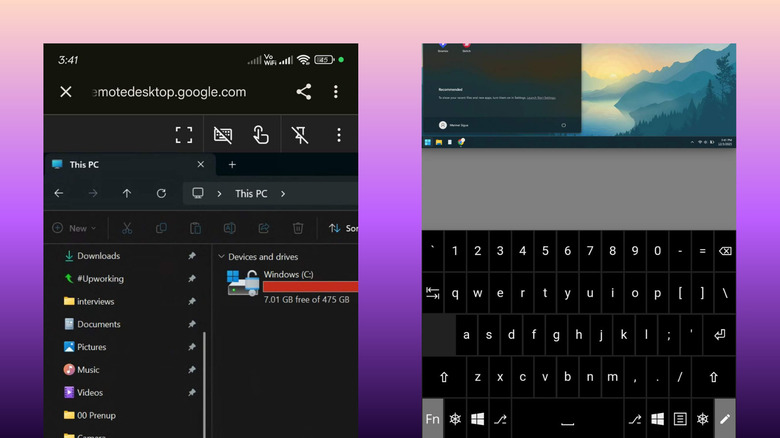
If you are a power user who treats their tablet as a primary workstation, Splashtop is the gold standard. I frequently use Splashtop because of its exceptional Samsung DeX integration. When you plug your Galaxy phone into a monitor and launch Splashtop, the experience is nearly indistinguishable from sitting at your actual PC. It supports a virtual trackpad that mimics a real mouse, making it easy to navigate complex software like Excel or Photoshop.
Splashtop is particularly strong in professional environments where unattended access is a requirement. You can jump into your office computer even if no one is there to click "Accept."
- Pros: Best-in-class mobile UI, high-speed streaming, excellent peripheral support.
- Cons: Most advanced features require a paid subscription.
DeskIn and AnyDesk: Built for Performance
When it comes to low latency android apps for remote pc gaming, DeskIn has become a recent favorite in the tech community. It offers dedicated frame rate optimization, allowing for up to 144Hz streaming if your network can handle it. This is essential for gaming or video editing, where even a few milliseconds of lag can ruin the experience.
AnyDesk remains a strong competitor here as well, offering a lightweight client that is famous for its "instant" connection feel. Both apps provide a virtual trackpad and customizable on-screen keys, which are vital when you need to use keyboard shortcuts on a touch interface.
- Pros: Ultra-low latency, support for high refresh rates, robust file transfer tools.
- Cons: Can be overkill for simple document editing; AnyDesk's free tier has become more restrictive recently.
Unified Remote: Local Peripheral Mastery
Sometimes, you don't need to see your screen; you just need to control it. Unified Remote is the king of local network computer control apps. It turns your Android device into a Wi-Fi or Bluetooth remote for your PC. It comes with pre-loaded remotes for YouTube, VLC, Spotify, and even a full keyboard and mouse replacement.
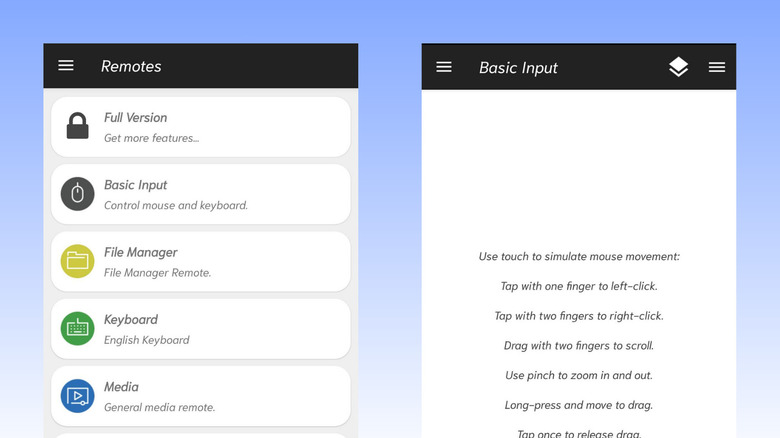
This is the perfect tool for home theater PC (HTPC) setups. Instead of keeping a bulky keyboard on your coffee table, you can manage your entire media library from your phone's notification shade.
- Pros: Deep integration with media apps, works over Bluetooth, very low battery drain.
- Cons: Doesn't offer screen mirroring (it’s a remote, not a desktop viewer).
RustDesk: The Privacy-Focused Alternative
With the remote work landscape shifting, many are looking for the best teamviewer alternatives for android users 2026. RustDesk is an open-source solution that has gained massive traction. Unlike proprietary apps, RustDesk allows you to host your own relay server. This ensures that your data never passes through a third-party corporate server, providing a level of privacy that most commercial apps can't match.
- Pros: Open-source, self-hostable, no recurring fees for self-hosters.
- Cons: Setting up your own server requires some technical knowledge.
Essential Security and Performance Features
When you choose secure remote access software for android to pc, security should be your first priority. You are essentially opening a door into your entire digital life.
First, look for apps that offer End-to-end encryption. This ensures that even if someone intercepts the data stream between your phone and your PC, they cannot read the contents. Most modern apps use AES 256-bit encryption, which is the industry standard.
Second, never use a remote desktop app without enabling Two-factor authentication (2FA). This adds a second layer of defense, requiring a code from your phone or an authenticator app before access is granted.
For performance, one of my favorite features to look for is Wake-on-LAN. This allows you to send a "magic packet" to your computer to wake it up from sleep mode. It’s a great way to save energy without losing the ability to access your files remotely. Furthermore, look for apps that support Multi-monitor support and Clipboard synchronization. Being able to copy a link on your Android phone and paste it directly into a browser on your remote PC is a massive productivity booster.
Finally, if you are connecting over public Wi-Fi—like at a coffee shop or airport—always use a VPN. Even with encrypted apps, a VPN provides an extra tunnel of security that hides your connection from prying eyes on the same network.
FAQ
Which is the best remote desktop app for Android?
For most users, Chrome Remote Desktop is the best choice due to its simplicity and the fact that it is completely free. However, if you are a professional looking for high-end features like Samsung DeX support and unattended access, Splashtop is the superior option. For gamers, DeskIn or AnyDesk offer the lowest latency and highest frame rates.
How can I control my PC from an Android phone?
To control your PC, you need to install a host application on your computer and the corresponding client app on your Android device. For a cloud-based solution like Chrome Remote Desktop, you simply sign in with the same Google account on both devices. For local tools like Unified Remote, ensure both devices are on the same Wi-Fi network or paired via Bluetooth to establish a connection.
Are remote desktop apps for Android safe?
Yes, provided you choose reputable software that uses industry-standard security protocols. Always look for apps that provide End-to-end encryption and Two-factor authentication. It is also highly recommended to use a VPN when accessing your computer over a public network to ensure your data remains private and protected from potential intruders.
Can I access my Mac using an Android device?
Yes, several of the top Android remote desktop apps support macOS. Chrome Remote Desktop and Splashtop are excellent cross-platform solutions that work seamlessly between Android and Mac. While Microsoft Remote Desktop is primarily for Windows, most other third-party tools are designed to be compatible with both major desktop operating systems.
What is the best free remote desktop app for Android?
Chrome Remote Desktop is widely considered the best free option because it doesn't have a "pro" paywall for basic remote access and works across all major platforms. RustDesk is another excellent free and open-source alternative for users who want more control over their data and the ability to self-host their own connection servers.