Our Top Picks
| App Name | Best For | Key Productivity Feature |
|---|---|---|
| Joplin | Research & Notes | Markdown support and encrypted sync |
| Ente Auth | Security | Open source 2FA code management |
| Everything | File Management | Near-instant local file indexing |
| Microsoft PowerToys | Power Users | Advanced window management (FancyZones) |
| 7-Zip | Privacy & Archives | AES-256 encryption for data security |
The best free productivity apps for Windows 11 in 2026 include Joplin for cross-platform note-taking with Markdown support, Ente Auth for secure two-factor authentication management, and Everything for near-instant file searching. Microsoft PowerToys and 7-Zip are also essential utilities for system enhancement and secure file extraction.
As Windows 10 support ended in late 2025, moving to Windows 11 in 2026 requires the right tools to stay productive. These 5 free Windows 11 apps are essential for reclaiming performance and organization in an era where subscription fatigue is at an all-time high. Whether you are building a new workstation or optimizing a laptop, these essential free windows 11 utilities for everyday productivity will help you bypass the bloat and get straight to work.
1. Joplin: The Best Open Source Alternative for Note-Taking
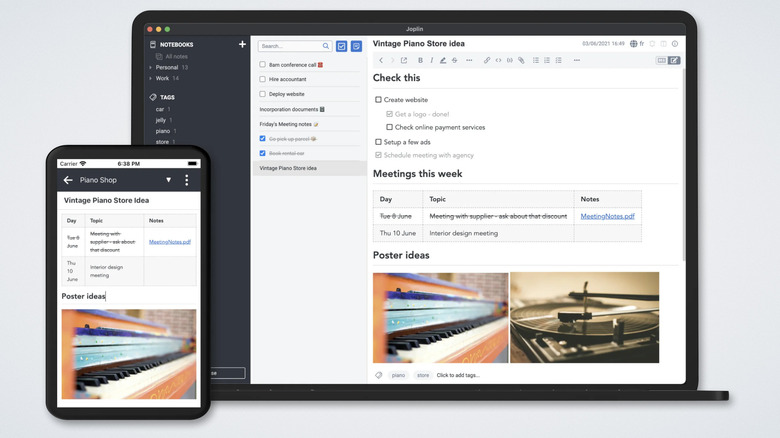
Look, I’ve tried every note-taking app on the market. While Obsidian is fantastic, its sync service comes with a monthly bill that adds up over time. If you want a truly best open source productivity software for windows 11, Joplin is where you should land. It is a robust, privacy-focused tool that handles thousands of notes without breaking a sweat.
What makes Joplin stand out for researchers and builders is its native Markdown support. You aren't fighting with a finicky WYSIWYG editor; you are writing in plain text that remains future-proof. But the real clincher is the security. Unlike many mainstream alternatives, Joplin offers optional End-to-end encryption. This means your private thoughts and project blueprints are encrypted on your device before they ever hit the cloud.
For those of us moving between a desktop rig and a mobile device, the cross-platform synchronization is seamless. You can use Dropbox, OneDrive, or even your own WebDAV server to keep your data in sync. It is the top free windows 11 apps for note taking and organization because it puts the user in control of their data, rather than locking it behind a proprietary file format.
Pro Tip: Use the Web Clipper extension for Chrome or Firefox to save entire web pages or screenshots directly into Joplin. It’s a lifesaver for gathering technical documentation during a PC build.
2. Ente Auth: Securing Your Digital Workflow
In 2026, security isn't just an IT concern; it is a productivity fundamental. If you lose access to your accounts, your workflow stops dead. While many people use their phones for Two-factor authentication, having a reliable desktop client is a game-changer for efficiency. Ente Auth is an open source apps for windows 11 that provides a clean, encrypted way to manage your TOTP codes.
Most 2FA apps are mobile-only, which forces you to pick up your phone every time you log into a service on your PC. That is a focus-killer. Ente Auth brings those codes to your Windows 11 taskbar with End-to-end encryption and cloud sync that doesn't cost a dime. If your phone dies or goes missing, you aren't locked out of your life because your codes are safely backed up and accessible from your desktop.
For a power user, the ability to quickly copy a code with a click is much faster than squinting at a mobile screen. It’s a simple utility, but in terms of essential windows 11 utilities, it’s one that I install on every machine I build to ensure my digital workspace remains both accessible and hardened against attacks.

3. Everything: Instant Search Beyond Windows Indexing
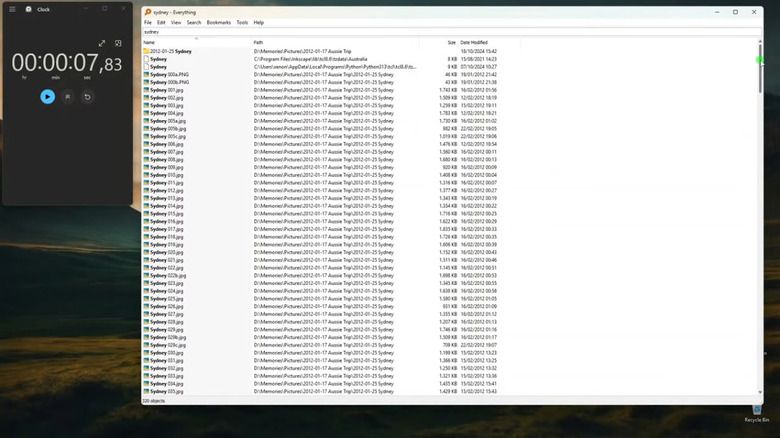
We need to have a serious talk about Windows Search. Even in 2026, the native search in Windows 11 can be sluggish, often prioritizing web results via Bing over the actual file sitting on your NVMe drive. Everything by Voidtools is the best free file management software for windows 11 users who value their time. It doesn't just search; it finds.
Everything works by reading the Master File Table (MFT) on your NTFS volumes. This allows for near-instant Local file indexing. When you type a filename, the result appears before you finish the third letter. It consumes negligible system resources, making it a perfect fit for resource management on both high-end desktops and thin-and-light laptops.
If you are managing massive libraries of computer components, project assets, or technical manuals, the ability to filter by file type or use regex (regular expressions) transforms how you interact with your storage. It turns a chaotic file system into a searchable database. This is one of those best free windows productivity tools that, once you use it, makes the default OS experience feel broken by comparison.
4. Microsoft PowerToys: The Ultimate Productivity Swiss Army Knife
If Microsoft PowerToys didn't exist, we would have to invent it. This is a collection of must have free windows 11 power user apps for efficiency that fills in the gaps Microsoft left in the base operating system. For anyone using a high-resolution monitor or a multi-monitor setup, the FancyZones feature alone justifies the installation. It allows you to create complex window layouts that go far beyond the basic snap layouts in Windows 11.
Beyond window management, PowerToys includes utilities for system performance tuning and workflow shortcuts. The PowerToys Run feature acts as a quick launcher (similar to Spotlight on macOS), and the "Always on Top" toggle is indispensable when you are cross-referencing data between a spreadsheet and a web browser.
I also frequently use the Image Resizer and PowerRename tools. When you are dealing with hundreds of hardware photos or system logs, being able to bulk-rename or resize them via a right-click menu saves hours of manual labor. It is a masterclass in how free Windows 11 apps should behave: lightweight, powerful, and deeply integrated into the shell.
Pro Tip: Press Win + Shift + T to use the Text Extractor in PowerToys. It uses OCR to grab text from any image or video on your screen, which is perfect for copying error codes that you can't normally highlight.
5. 7-Zip: Necessary Security for Archive Management
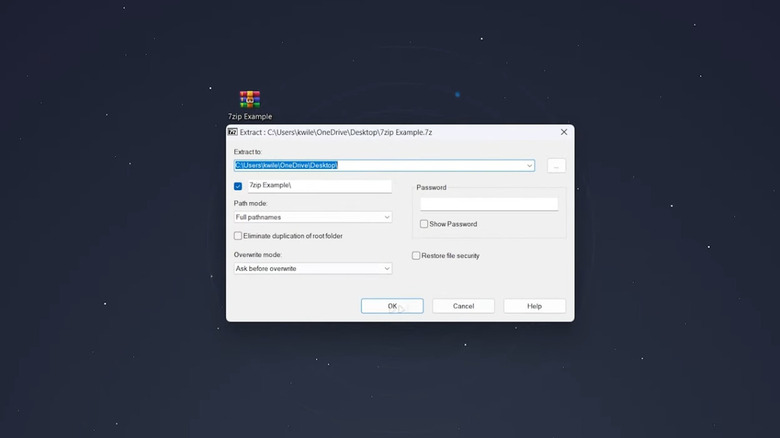
You might be wondering why 7-Zip is on this list in 2026, especially since Windows 11 now has native support for RAR and 7z files. The reason is simple: security and control. Native Windows support is fine for extracting a simple folder, but it lacks the advanced features required for secure file extraction and creation.
7-Zip is a legendary open source apps for windows 11 that provides AES-256 encryption for your archives. If you are sending sensitive project data or backups to a cloud drive, you should be encrypting those files locally first. 7-Zip makes this process effortless. Furthermore, it remains significantly faster than the native Windows Explorer integration, especially when dealing with thousands of small files or massive multi-gigabyte archives.
For PC builders and professionals, 7-Zip is also the go-to for checking file integrity via checksums (CRC and SHA-256). It is a no-nonsense tool that respects your system resources and provides a level of transparency that closed-source alternatives simply can't match.
Bonus: Wintoys for Performance Optimization
While we are focusing on productivity, we can't ignore the platform itself. Windows 11 has become increasingly heavy. By 2025, Microsoft Copilot reached 218 million active users, and while AI features can be helpful, they also consume significant background resources.
Wintoys is a free windows 11 system optimization apps for faster workflow that allows you to take back control. It provides a clean interface to disable unnecessary telemetry, background services, and even the AI bloat if it’s hindering your frame rates or compile times. It is a surgical tool for system performance tuning, helping you ensure that your hardware is dedicated to your work, not background processes.
FAQ
What are the best free apps for Windows 11?
The best free apps currently available focus on replacing slow native features with high-performance alternatives. Key recommendations include Joplin for notes, Everything for file searching, and Microsoft PowerToys for advanced window management. These tools are often open-source and prioritize user privacy over data tracking.
What are the most essential free apps for a new PC?
For a fresh installation, you should prioritize a solid archive manager like 7-Zip, a security-focused 2FA tool like Ente Auth, and a system optimizer. These provide the foundation for a secure and fast experience before you begin installing larger professional software suites.
Are there free alternatives to popular paid Windows software?
Yes, many paid subscriptions can be replaced with open-source tools. For instance, Joplin is an excellent alternative to Evernote or the paid sync tier of Obsidian. Similarly, Ente Auth serves as a free, encrypted replacement for paid password managers that charge for 2FA features.
What are the best free utility tools for Windows 11?
Microsoft PowerToys is widely considered the gold standard for utility tools, offering everything from bulk file renaming to custom screen zones. For file management, Everything is the fastest search utility available, vastly outperforming the built-in Windows search index.
Are free apps from the Microsoft Store safe to download?
Generally, yes, as they undergo a basic vetting process. However, for maximum security, many power users prefer downloading open-source apps directly from their official GitHub repositories or websites like Voidtools. This ensures you are getting the most recent version without potential store-related overhead.